Free Online Photo Editor No Upload: The Ultimate Privacy-First Image Editing Guide
A free online photo editor with no upload is one that processes every edit in your browser instead of on a server, and that is exactly what Privacy Pix Tools offers: a free online photo editor that never uploads your files. Every crop, filter, and transformation happens right on your device, so your photos truly stay private.
Why Your Photo Editor Choice Matters for Privacy
Every day, millions of people use online photo editors to crop images, add filters, resize photos for social media, or create quick graphics. Most don't think twice about what happens to their images after clicking "Upload." But here's the uncomfortable truth: most popular online photo editors store your images on their servers.
When you upload a family photo to edit it on a typical online editor, that image travels across the internet to a data center somewhere. It gets processed on remote servers. It might be temporarily cached. In some cases, it could be analyzed by AI systems to improve their services. Even if a privacy policy promises deletion, can you really verify that your image is gone forever?
This matters especially when you're editing:
- Personal photos – Family pictures, vacation memories, photos of your children
- Sensitive documents – Screenshots of financial information, medical records, legal documents
- Business materials – Confidential presentations, unreleased product images, proprietary designs
- Identity documents – Passport photos, ID cards, signatures
For these use cases, you need a browser-based photo editor that processes everything client-side – meaning all the work happens on your own computer, and your images never leave your device.
Introducing the Privacy Pix Tools Photo Editor
Our Free Online Photo Editor is built on a simple but powerful principle: your images should never leave your device. Using modern web technologies like HTML5 Canvas and Fabric.js, we've created a full-featured image editor that runs entirely in your browser.

How Client-Side Processing Works
When you open an image in our editor, here's what happens:
- You select an image from your computer (or drag and drop it)
- Your browser reads the image file directly from your local storage
- The image is rendered on an HTML5 Canvas element
- All edits (filters, crops, rotations) are calculated by your browser's JavaScript engine
- When you save, your browser generates a new image file and downloads it to your computer
At no point does your image travel over the internet. You can even verify this yourself: open our photo editor, load an image, disconnect from the internet, and continue editing. Everything works offline because it's all running locally.
Complete Feature Breakdown
Just because we prioritize privacy doesn't mean we've compromised on features. Our online image editor includes everything you need for professional-quality results:
1. Filters & Light Adjustments
Transform the mood of your photos with our comprehensive lighting and filter controls:
- Brightness Control – Brighten dark photos or tone down overexposed shots with precision sliders
- Contrast Adjustment – Add punch to flat images or soften harsh contrasts
- Grayscale Filter – Convert any photo to elegant black and white with a single click
- Sepia Tone – Apply a warm, vintage aesthetic reminiscent of old photographs
Unlike competitors that require premium subscriptions for filter access, all our filters are completely free. There are no watermarks, no limits, and no hidden fees.
2. Resize Images
Need to resize a photo for a website, email, or social media? Our resize tool gives you complete control:
- Pixel-Perfect Dimensions – Enter exact width and height values for precise sizing
- Aspect Ratio Lock – Maintain proportions automatically when resizing (enabled by default)
- Real-Time Preview – See the results before applying changes
Whether you're optimizing images for web performance, preparing photos for print, or creating thumbnails, our resizer handles it all. And because processing happens locally, even large images resize quickly without waiting for server responses.
3. Crop Tool
Remove unwanted areas from your photos with our intuitive crop tool:
- Free-Form Cropping – Draw any rectangular selection to extract exactly what you need
- Preset Aspect Ratios – Quick buttons for common formats:
- Square (1:1) – Perfect for Instagram profile photos and thumbnails
- 16:9 – Optimal for YouTube thumbnails and widescreen displays
- 4:3 – Classic photo format ideal for most prints
- Drag-to-Adjust – Resize and reposition your crop area visually
4. Transform (Rotate & Flip)
Correct orientation issues or create mirror effects:
- Rotate Left/Right – 90-degree rotations for quick orientation fixes
- Flip Horizontal – Mirror images left-to-right (great for selfies)
- Flip Vertical – Mirror images top-to-bottom
These transformation tools are essential when your camera or phone saves images in the wrong orientation, or when you need to create design symmetry.
5. Freehand Drawing
Add handwritten annotations, signatures, or artistic touches directly to your images:
- Customizable Brush Color – Choose any color from a full color picker
- Adjustable Brush Size – From fine lines to bold strokes, control the width precisely
- Smooth Vector Drawing – Lines are rendered smoothly for professional-looking results
- Toggle On/Off – Easily switch between drawing mode and selection mode
6. Text Overlay
Add captions, labels, watermarks, or any text to your images:
- Multiple Font Choices – Arial, Times New Roman, Courier New, Verdana, Impact
- Custom Colors – Apply any color to make text stand out or blend subtly
- Drag-and-Position – Place text anywhere on your canvas with mouse controls
- Resize & Rotate – Scale and rotate text objects for dynamic layouts
7. Shapes
Create diagrams, callouts, or design elements with geometric shapes:
- Rectangles – For frames, highlights, or boxes
- Circles – Perfect for profile picture frames or bullet points
- Triangles – For directional indicators or decorative elements
- Arrows – Essential for tutorials, annotations, or pointing out details
All shapes come with customizable fill colors and can be resized, rotated, and repositioned freely on the canvas. This makes our tool excellent for creating instructional graphics, social media posts, or annotated screenshots.
8. Stickers & Emoji
Add fun and expression to your photos with our sticker library:
- 😀 Smiling Face
- 😎 Cool Face
- ❤️ Heart
- ⭐ Star
- 🔥 Fire
- 🎉 Party
Stickers are fully scalable and positionable, making them perfect for social media content, memes, or adding personality to professional presentations.
9. Frame Borders
Give your images a polished, finished look with decorative frames:
- Simple Frame – Clean single-line border
- Double Frame – Elegant dual-line effect
- Custom Frame Color – Match the border to your image or brand
10. Rounded Corners
Modern design often calls for soft, rounded edges. Our corner radius tool lets you:
- Adjust Roundness – Slider from no rounding to circular edges
- Real-Time Preview – See the effect as you adjust
- Export with Transparency – Rounded corners export with transparent backgrounds (PNG format)
This feature is particularly useful for creating app icons, social media avatars, or any design requiring modern aesthetics.
11. Canvas Background
Control the canvas background color for:
- Creating images with solid color backgrounds instead of transparency
- Matching your brand colors when creating social media content
- Adding contrast to make your image stand out
12. Layers Panel
Our professional-grade layers system gives you non-destructive editing power:
- Visual Layer List – See all objects (shapes, text, stickers) in a manageable sidebar
- Select from List – Click layer names to select objects on the canvas
- Reorder Layers – Control what appears on top of what
This feature elevates our editor beyond simple "one-click" tools into territory previously reserved for desktop applications like Photoshop.
13. History (Undo/Redo)
Made a mistake? No problem:
- Unlimited Undo – Step back through your entire editing history
- Redo – Bring back changes you've undone
- Reset All – Start fresh with a single click
14. Zoom Controls
Work with precision using our zoom tools:
- Zoom In/Out – Get closer for detailed edits or step back for overview
- Percentage Display – Know exactly what magnification you're working at
15. Multi-Format Export
Save your finished work in the format you need:
- PNG – Best for graphics with transparency or when quality is paramount
- JPEG – Optimized file size for photographs
- WebP – Modern format with excellent compression for web use
How We Compare to Other Online Photo Editors
Let's be transparent about how Privacy Pix Tools stacks up against popular alternatives:
| Feature | Privacy Pix Tools | Canva | Pixlr | Photopea |
|---|---|---|---|---|
| No Upload Required | ✅ Yes | ❌ No | ❌ No | ✅ Yes |
| 100% Free | ✅ Yes | ⚠️ Limited | ⚠️ Limited | ✅ Yes (ads) |
| No Account Required | ✅ Yes | ❌ No | ❌ No | ✅ Yes |
| Works Offline | ✅ Yes | ❌ No | ❌ No | ✅ Yes |
| Simple UI | ✅ Yes | ✅ Yes | ⚠️ Complex | ⚠️ Photoshop-like |
| Layers Support | ✅ Yes | ✅ Yes | ✅ Yes | ✅ Yes |
Key Differentiator: While Photopea also offers client-side processing, it comes with a steep learning curve designed for Photoshop professionals. Privacy Pix Tools strikes the ideal balance: privacy-first processing with a user-friendly interface that anyone can master in minutes.
Step-by-Step Tutorial: Edit Your First Photo
Ready to try it yourself? Here's a complete walkthrough:
Step 1: Open the Photo Editor
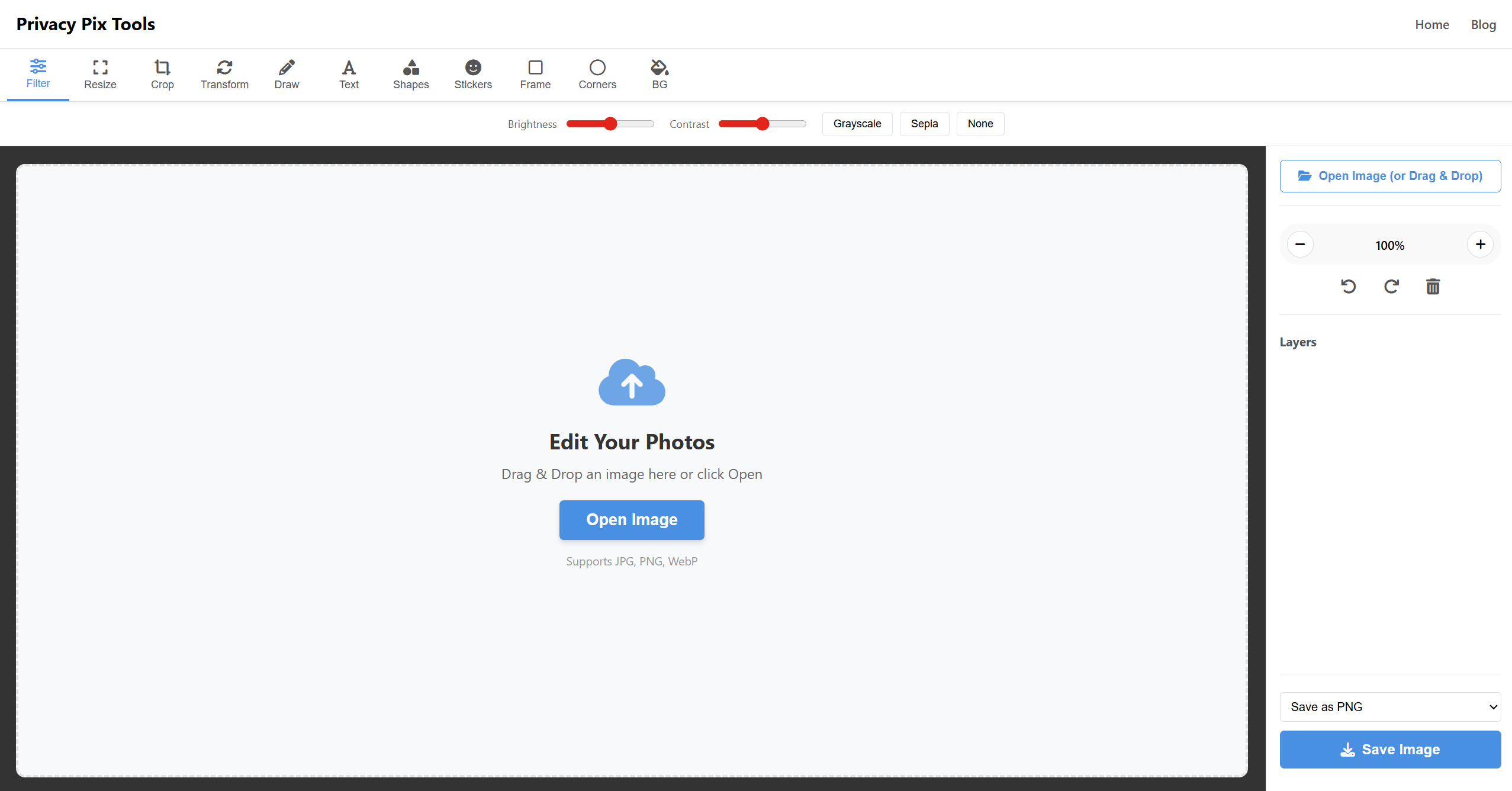
Navigate to our Photo Editor Tool. You'll see a clean welcome screen inviting you to upload an image.
Step 2: Load Your Image
You have two options:
- Click "Open Image" – Select a file from your computer's file browser
- Drag and Drop – Drag an image file directly onto the editor window
Supported formats include JPG, PNG, and WebP.
Step 3: Make Your Edits
Use the toolbar at the top to access different editing modes:
- Filter – Adjust brightness, contrast, or apply grayscale/sepia filters
- Resize – Change image dimensions while maintaining aspect ratio
- Crop – Select a region to keep and discard the rest
- Transform – Rotate or flip your image
- Draw – Add freehand annotations
- Text – Insert text labels or watermarks
- Shapes – Add rectangles, circles, triangles, or arrows
- Stickers – Drop emoji onto your image
- Frame – Add decorative borders
- Corners – Round the edges of your image
- BG – Change the canvas background color
Step 4: Use the Sidebar Tools
The right sidebar provides additional controls:
- Zoom – Get closer for detailed work
- Undo/Redo – Step back through your changes
- Layers – Manage objects you've added
- Export – Choose your output format (PNG, JPG, or WebP)
Step 5: Save Your Work
Select your desired format from the dropdown menu and click "Save Image". Your edited image will download directly to your computer. No account needed. No cloud storage. Just your file, exactly as you made it.
Who Is This Tool For?
Our privacy-focused photo editor serves a wide range of users:
Privacy-Conscious Individuals
If you're uncomfortable with your personal photos being uploaded to unknown servers, this tool lets you edit with peace of mind. Family photos, medical documents, financial screenshots – whatever you're editing stays on your device.
Business Professionals
When you're working with confidential business materials – unreleased product photos, internal presentations, or sensitive client data – you can't risk those images leaking. Our client-side processing ensures total confidentiality.
Content Creators
Bloggers, social media managers, and YouTubers who need quick edits without the overhead of signing up for another subscription service. Crop that thumbnail, add text, save, and publish – all in seconds.
Students and Educators
Schools often limit software installations. Our browser-based tool requires no downloads and works on any computer with a modern web browser – perfect for classroom assignments and educational content creation.
Developers and Tech Professionals
When you need to quickly annotate screenshots for documentation, resize images for README files, or create simple graphics, you don't need Photoshop. Open our tool, make the edit, and move on.
Technical Specifications
Browser Compatibility
Our photo editor works in all modern browsers:
- Google Chrome (recommended)
- Mozilla Firefox
- Microsoft Edge
- Safari
System Requirements
Because processing happens locally, performance depends on your device:
- Minimum: Any device with 4GB RAM and a modern browser
- Recommended: 8GB RAM for large images (4000x4000 pixels or larger)
Technology Stack
- Canvas Rendering: HTML5 Canvas API
- Object Management: Fabric.js for layers and interactive elements
- Image Processing: JavaScript-based filters and transformations
Frequently Asked Questions
Is this photo editor really free?
Yes! All features are completely free. There are no premium tiers, no watermarks on exports, and no artificial limits on usage. We support the tool through minimal, non-intrusive advertising.
Do you store my images?
No. We literally cannot store your images because they never reach our servers. All processing happens in your browser using JavaScript. Your images exist only on your device.
Can I use this tool offline?
Yes. After the page loads, you can disconnect from the internet and continue editing. The editor runs entirely on your local JavaScript engine.
What's the maximum image size?
There's no hard limit, but performance depends on your device's memory. We recommend images under 8000x8000 pixels for smooth editing. Larger images may cause slowdowns on older devices.
How does this compare to Photoshop?
Adobe Photoshop is professional software with decades of features. Our tool doesn't aim to replace it. Instead, we offer a fast, free, privacy-focused alternative for common editing tasks. If you need advanced features like complex layer blending, RAW file editing, or precise color management, Photoshop remains the industry standard.
Is my browser safe when using this tool?
Absolutely. Our editor doesn't require any browser permissions beyond reading the files you explicitly provide. We don't access your webcam, microphone, or any other sensitive device features.
More Privacy Tools
Our photo editor is just one part of the Privacy Pix Tools suite. Explore our other client-side tools:
- Background Remover – AI-powered background removal, processed locally
- EXIF Metadata Remover – Strip location data and camera info from photos
- Privacy Blur – Blur faces and sensitive information
- HEIC to JPG Converter – Convert iPhone photos without uploading
- Diagram Maker – Create flowcharts and diagrams securely
Start Editing Now – It's Free
No signup. No uploads. No watermarks. Just open the tool and start editing your photos privately.
Open Photo EditorConclusion
In an age where data privacy is increasingly precious, the choice of photo editor matters more than you might think. Every image you upload to a cloud-based service is a piece of personal data leaving your control.
The Privacy Pix Tools Photo Editor offers a different path: professional-quality editing with absolute privacy. Your images never leave your device. There's no account to create, no subscription to manage, and no terms of service granting mysterious rights to your photos.
Whether you're a privacy advocate, a busy professional, a creative content creator, or simply someone who wants a fast, free, and simple photo editor – we've built this tool for you.
Try it today. You have nothing to lose – quite literally, because we never take anything from you in the first place.