Generate hand-drawn diagrams with Claude Code: the privacy-sketch skill
To generate hand-drawn diagrams with Claude Code, install the privacy-sketch skill, describe your diagram in plain English, then paste the JSON Claude returns into the Privacy Sketch editor. The skill runs entirely on your machine, makes no network calls, and needs no API keys.
Table of Contents
1. What is a Claude Code skill?
A skill, in Claude Code, is a folder that lives in your local ~/.claude/skills/ directory.
It contains a SKILL.md file with a name, a description, and instructions for the model. When
you ask Claude something that matches the skill's description, Claude reads the instructions and applies
them.
It is not a plugin, an API, or a server. It is text. The model is doing the work; the skill is just guidance.
The privacy-sketch skill teaches Claude exactly one thing: how to produce valid Privacy
Sketch JSON. It ships with the canonical schema.json, a long-form reference, and four real
example diagrams that Claude can read on demand.
2. Install it in two commands
Download the bundle, then unzip into your Claude Code skills folder.
Windows (PowerShell)
Expand-Archive -Force privacy-sketch-skill.zip "$env:USERPROFILE\.claude\skills\"macOS or Linux
unzip privacy-sketch-skill.zip -d ~/.claude/skills/Restart Claude Code. Run /skills to confirm privacy-sketch is listed. Full
instructions and verification steps live at the install
page.
3. Prompt 1, a CI/CD pipeline
Open Claude Code and prompt:
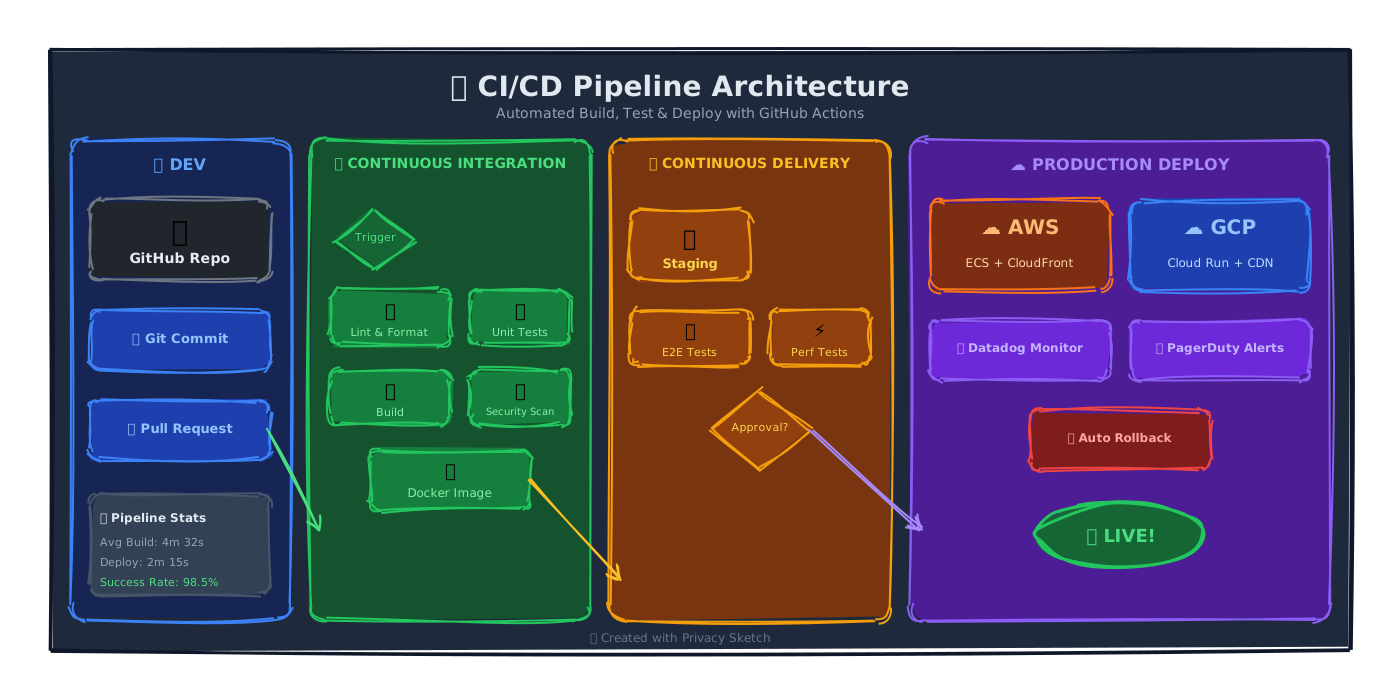
"Make a privacy-sketch diagram of a CI/CD pipeline with three stages: build, test, and deploy. Use a vertical layout, connect the stages with smart connectors, and use the amber palette."
Claude returns a single JSON document. Open Privacy Sketch, click Code, paste, click Apply.
That rendered SVG is one of the four reference diagrams shipped inside the skill itself. Claude has already read its JSON before answering, which is why its output uses the same structural pattern (vertical column, named smart connectors between stage cards).
4. Prompt 2, a multi-cloud architecture
"Draw a JAMstack architecture: a CDN at the top, a static site generator and Git repo in the middle, and three backend services (auth, payments, analytics) at the bottom. Use HStacks to group services, and label all the flows."
The result is a layered system diagram with grouped service tiles and labeled connectors:
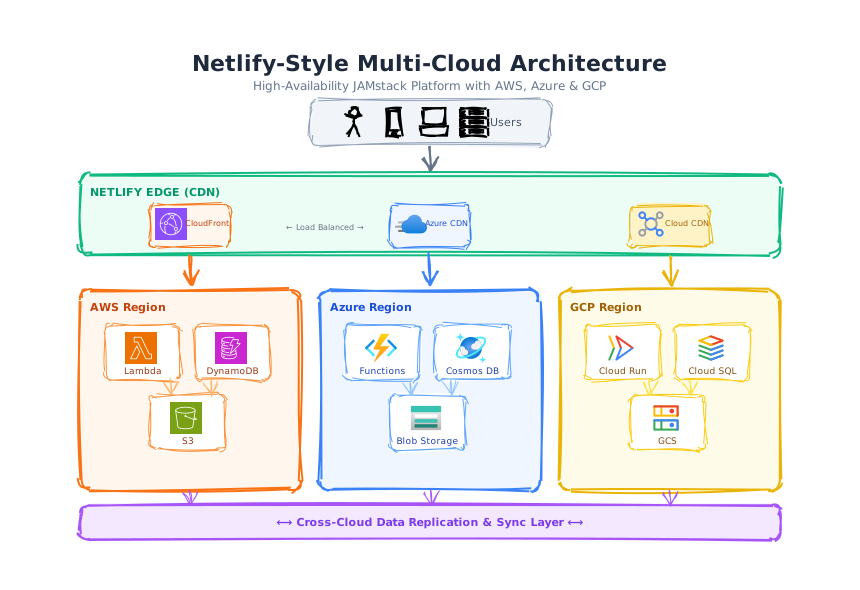
This works because the skill knows about layout containers (VStack, HStack,
Grid, ZStack) and tells Claude to prefer them over hand-placed coordinates.
5. Prompt 3, a product lifecycle mind map
"Generate a mind map of a SaaS product lifecycle: ideation, build, launch, growth, sunset. One central node, five branches, three subtopics each."
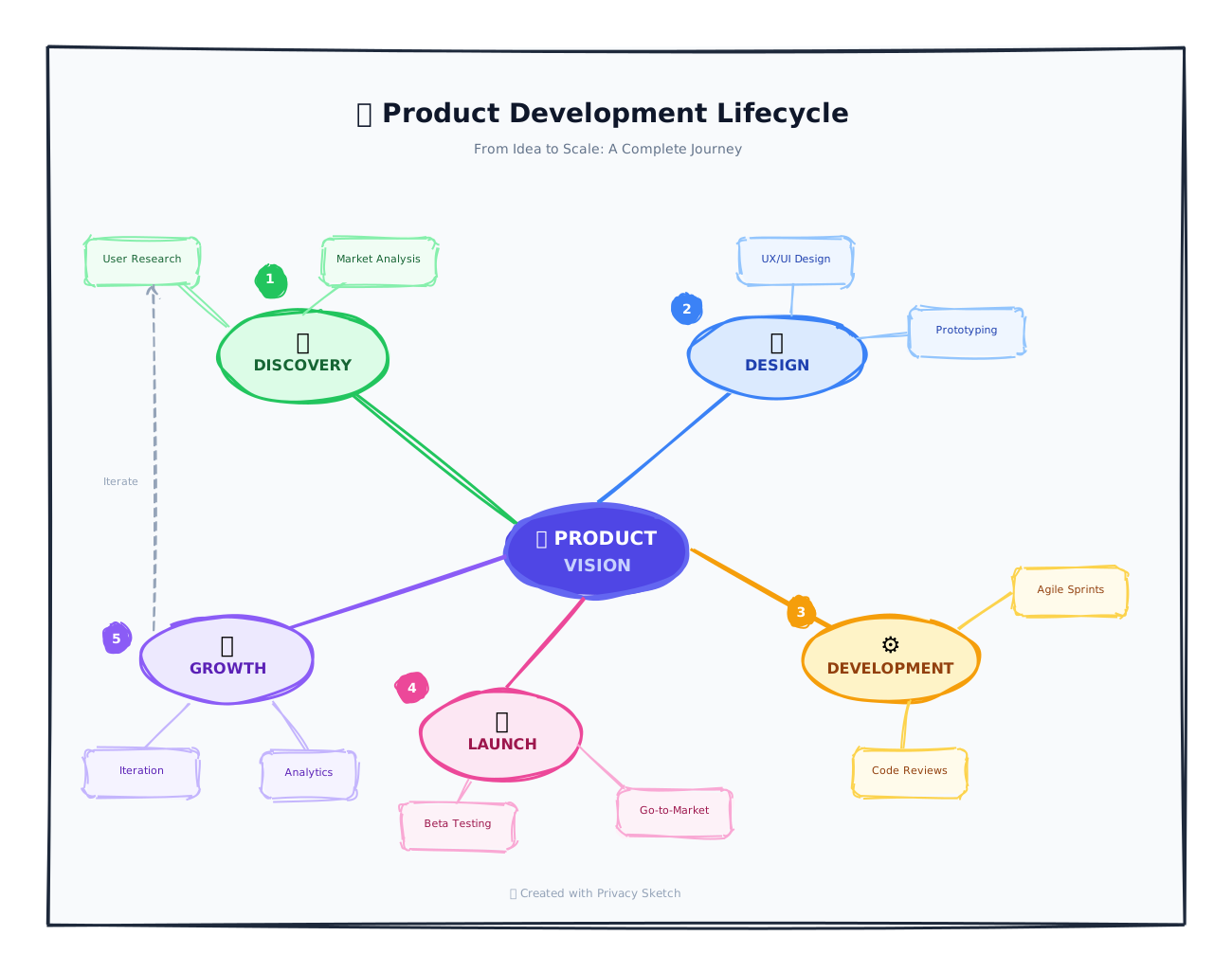
Radial layouts are easy to describe and hard to author by hand. The skill knows the patterns from its bundled examples, so Claude returns coordinates that actually look like a mind map and not a fan jammed into one corner.
6. What the skill does, and does not, do
It does.
- Teach Claude the canonical element types, layouts, and color tokens.
- Constrain Claude to valid
"version": "2.0"JSON. - Make smart connectors and layout containers the default for any structured diagram.
- Stay 100% local, no API calls leave your Claude Code install.
It does not.
- Render anything. The skill outputs JSON, you paste it into Privacy Sketch to see the diagram.
- Talk to PrivacyPixTools.com. The bundle has zero network calls. Re-read the
SKILL.mdif you want to verify. - Replace the editor. Claude is great at first drafts and structural rewrites. Fine-tuning a label position is still faster in the visual editor.
A note on the philosophy
The Privacy Sketch promise has always been: your diagram never leaves your device. We considered publishing an MCP server, a hosted skill registry, even an API. Each one would have meant adding a network hop. A folder you copy into a directory you already own does not.
Get the skill
Two clicks, two commands, then ask Claude for a diagram.
Download privacy-sketch-skill.zip Skill homepageRelated: The definitive guide to Privacy Sketch, LLM authoring reference, Privacy Sketch documentation.