Privacy Sketch: The Definitive Guide to Hand-Drawn Diagrams, JSON DSL, and Privacy-First Design
Privacy Sketch is a free, browser-based diagramming tool that renders hand-drawn style diagrams from a structured JSON DSL, with all processing happening locally so your work never leaves your device. This guide covers its philosophy, its full feature set, the AI generation workflow, and the tech stack underneath.
Table of Contents
1. The Renaissance of the Sketch
We are living through an era of "Digital Fatigue." Our eyes glaze over when we see yet another perfectly aligned, flat-design architecture diagram in a slide deck. It feels final. It feels immutable. It communicates: "This has been decided. Do not question it."
But software engineering, system design, and product management are inherently messy, iterative processes. When we document these systems, we need a visual language that matches their fluid nature.
The Cognitive Science of "Roughness"
Research in cognitive load and human-computer interaction suggests that the visual fidelity of a diagram changes how people interact with it. A low-fidelity, "rough" sketch invites participation. It signals to the viewer's brain that the idea is still in formation, that there is room for feedback, correction, and evolution.
"A rough sketch invites collaboration. A polished vector diagram demands compliance."
This is why whiteboard sessions are so productive. And this is exactly the dynamic Privacy Sketch captures,digitally, persistently, and structurally.
2. Philosophy: Code as Design
When we set out to build Privacy Sketch, we made a radical decision that separates it from tools like Figma, Miro, or Lucidchart. We decided that the Source of Truth would not be a proprietary binary blob or an opaque database entry. It would be JSON.
Data-First, Pixels-Second
In Privacy Sketch, what you see on the screen is merely a rendering of a structured data document. This "Code as Design" philosophy unlocks capabilities that traditional tools simply cannot match:
- Git-Friendly: You can commit your diagrams to version control. You can `git diff` a diagram. You can trace who changed the width of the load balancer in a pull request.
- Programmatic Generation: Because the file format is open and readable, you can write scripts to generate diagrams. Imagine an AWS Lambda function that scans your infrastructure and outputs a Privacy Sketch JSON file representing your live architecture.
- Interoperability: You aren't locked in. You can write a converter to transform Privacy Sketch JSON into Mermaid, PlantUML, or any other format.
🔒 Privacy by Architecture
Most modern tools are "Cloud First." You must upload your sensitive system architecture to their servers to edit it. Privacy Sketch is "Local First." The application loads into your browser's memory, and that's it. No data is sent to our servers. No analytics track your cursor. Your intellectual property stays on your machine.
3. Feature Deep Dive: Beyond Basic Shapes
Don't let the sketchy look fool you. Under the hood, Privacy Sketch is a precision instrument with a vast library of 40+ semantic elements designed for serious technical documentation.
The Shape Taxonomy
We've categorized our elements to cover the full spectrum of visual communication needs:
Geometric Primitives
The building blocks. Rectangle, Ellipse, Triangle,
Diamond. These form the base of most structural diagrams.
Flowchart Semantics
Specific shapes for logic flows. The Diamond for decisions ("Is user logged in?"), the
Cylinder for databases ("User Table"), the Parallel (Parallelogram) for I/O.
The Connectors
Connecting ideas is as important as the ideas themselves. We offer:
- Straight Arrows: For direct, rigid relationships.
- Curved Arrows: For organic flows and avoiding obstacles.
- Bidirectional Arrows: For handshakes and mutual relationships.
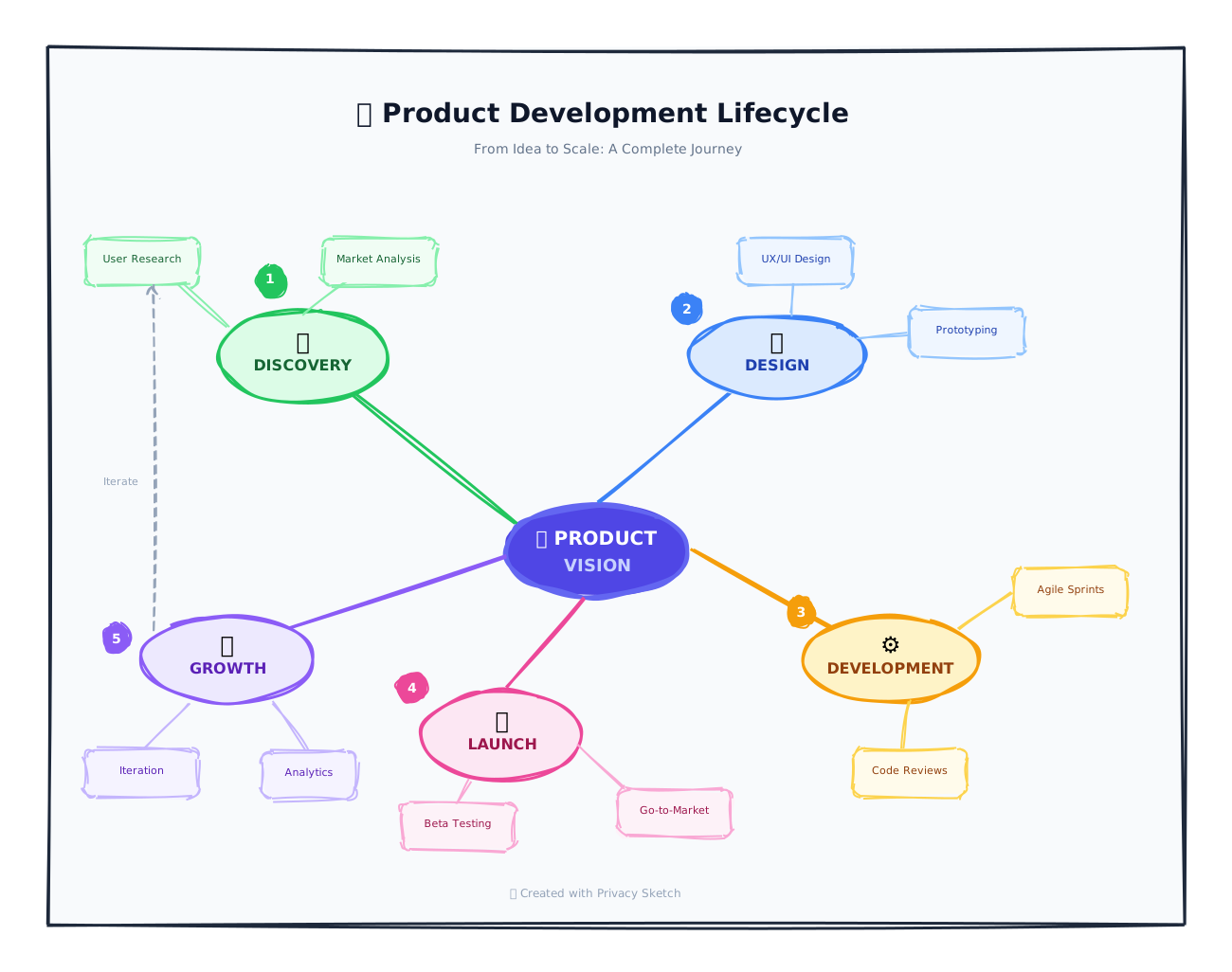
Curved connectors allow for organic, mind-map style layouts that feel less rigid than grid-based diagrams.
Styling: The "Roughness" Parameter
One of our unique features is the diverse styling engine. You aren't stuck with one "look."
- Roughness 0: Clean, straight lines. Almost vector-perfect, but with a hand-drawn stroke width variance.
- Roughness 2 (Default): The classic "sketched" look. Lines wobble slightly, fills are imperfect.
- Roughness 5: Chaos mode. Highly energetic, messy lines. Great for "napkin sketch" aesthetics.
Combine this with Hachure Fills (hatched lines) versus Solid Fills to create visual hierarchy. Use a solid fill for your primary call-to-action button in a wireframe, and hachure fills for background elements.
4. The AI Revolution: Structured Generation
This is where things get truly exciting. We are in the middle of a generative AI boom, but generating diagrams has remained a solved problem only for pixel-based generators (which struggle with text) or code-based generators (Mermaid, which is visually limited).
Privacy Sketch bridges this gap alongside Large Language Models (LLMs) like GPT-4, Claude 3, and Gemini.
Why Image Generators Fail at Diagrams
If you ask an image generator for a "System Architecture Diagram," you get a hallucination. The text is garbled alien script. The servers melt into the cables. You cannot edit it. You cannot fix a typo. It is a dead pixel blob.
The Privacy Sketch Advantage: JSON DSL
Because Privacy Sketch uses a structured JSON Domain Specific Language (DSL), LLMs can write the diagram instead of drawing it. They understand JSON perfectly.
// What the LLM generates (simplified):
{
  "type": "rectangle",
  "id": "load-balancer",
  "x": 100, "y": 100,
  "label": "NGINX LB"
},
{
  "type": "arrow",
  "start": "load-balancer",
  "end": "web-server-01"
}
This output is deterministic and editable. If the LLM spells "NGINX" wrong, you just double-click the shape in Privacy Sketch and fix it. You don't have to re-roll the dice.
💡 Pro Tip: The "Human-in-the-Loop" Workflow
1. Prompt: Ask the LLM to "Generate a Privacy Sketch JSON for a microservices architecture..."
2. Import: Paste the JSON into the tool.
3. Refine: The LLM might stack shapes on top of each other. Use your human eye to drag them apart, organize the layout, and add the final polish.
This combines the speed of AI with the spatial intelligence of a human.
5. Masterclass: Building Real-World Systems
Theory is great, but let's look at practice. We have created a series of comprehensive tutorials demonstrating exactly how to build complex systems with Privacy Sketch. Each tutorial includes a "What You'll Build" SVG preview.
Cloud Architecture Systems
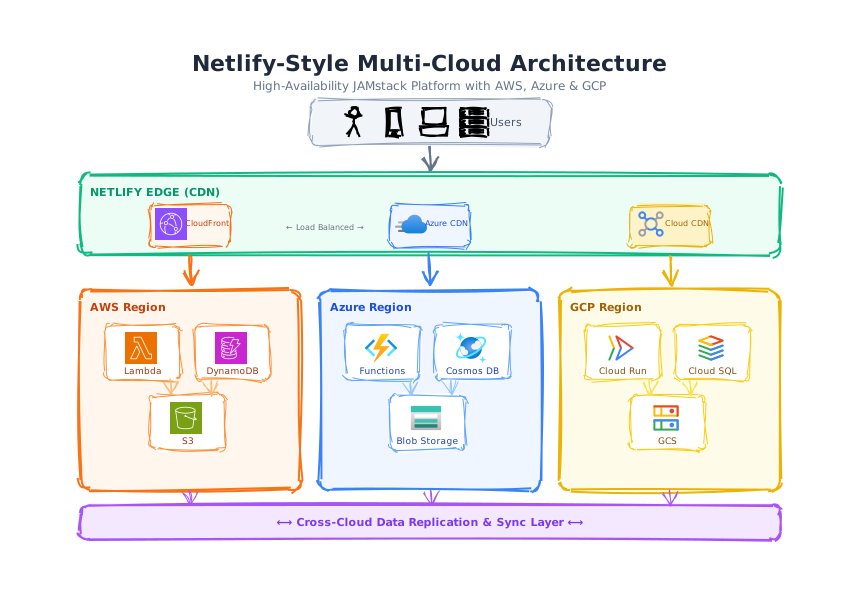
Learn to map complex multi-cloud deployments involving AWS, Azure, and GCP. Master the use of icons, grouping, and hierarchical layout.
View Tutorial →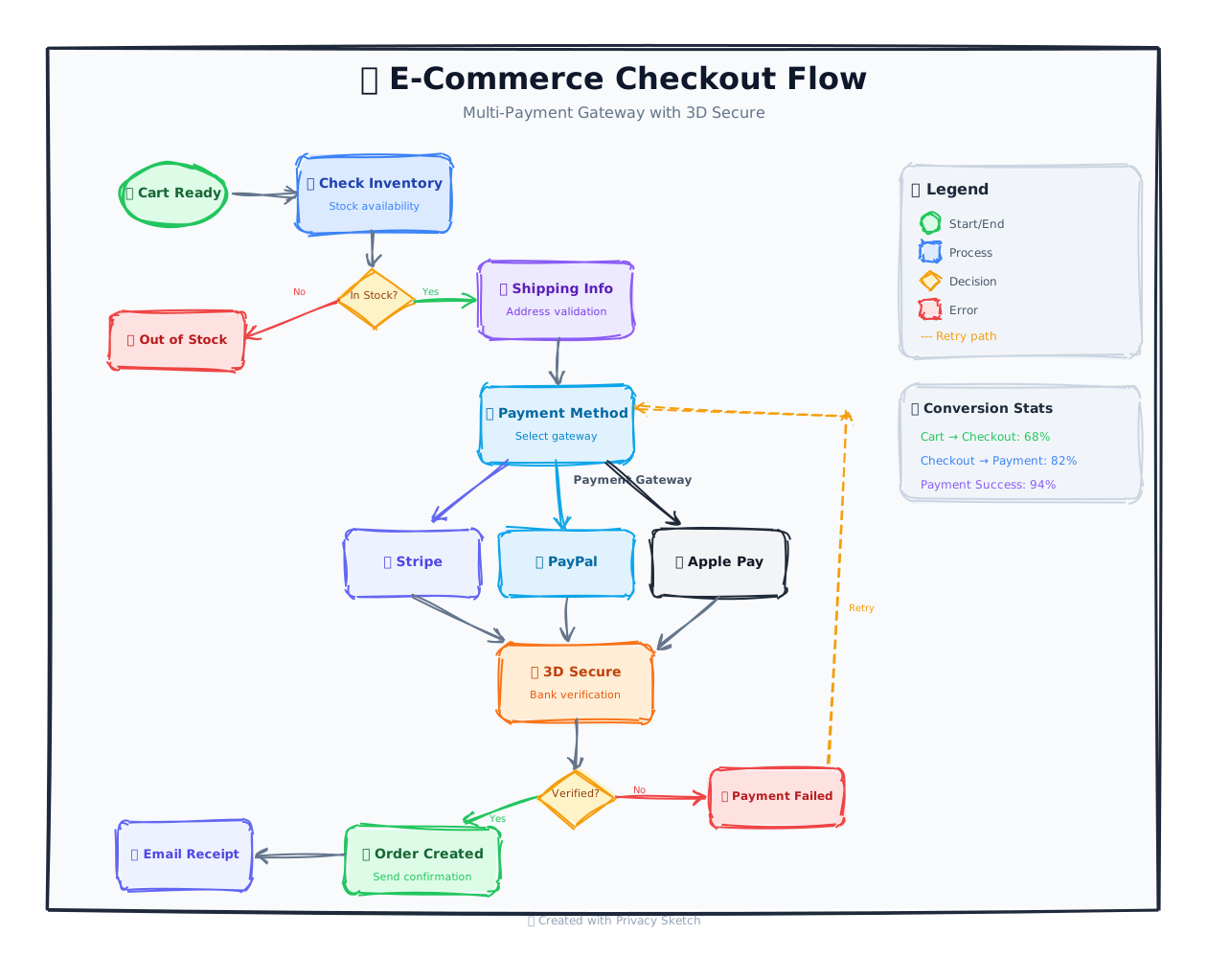
User Flows & Logic
Map the critical path of an e-commerce checkout. Learn to use Decision Diamonds, conditional logic arrows, and annotations for edge cases.
View Tutorial →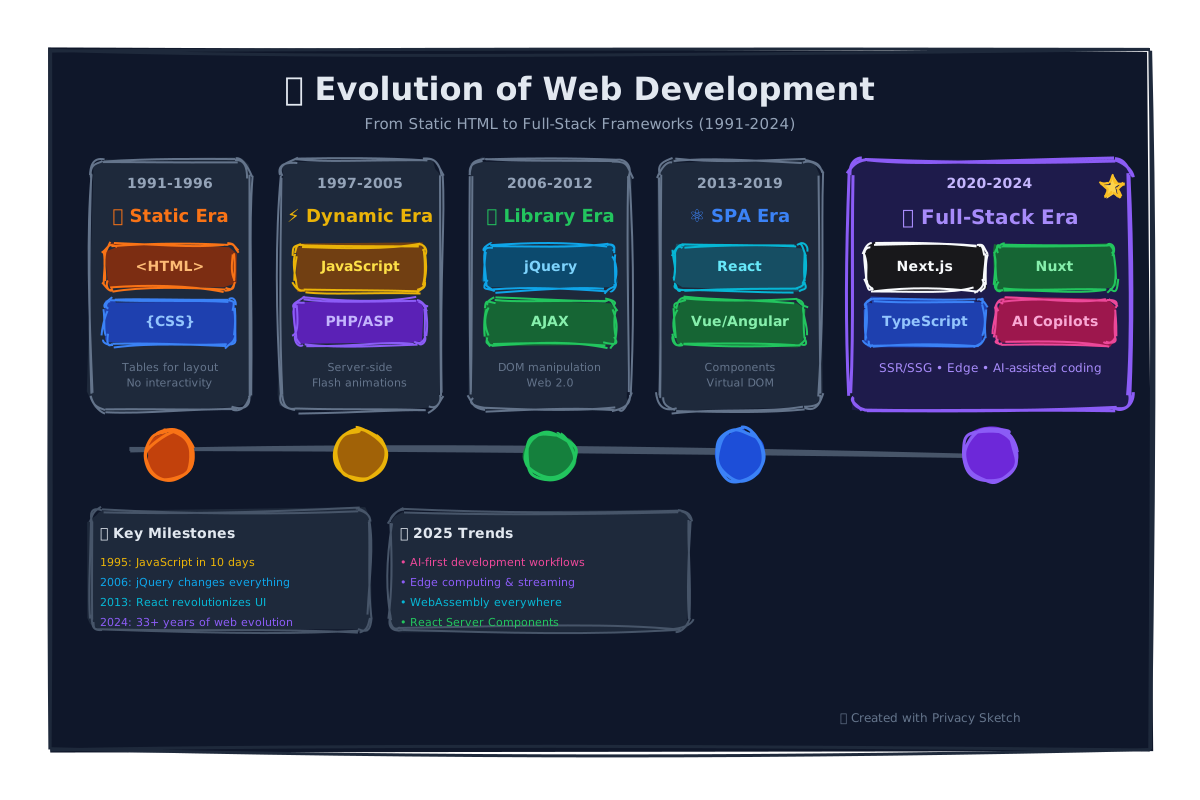
Historical Data & Roadmaps
Visualize time-based data. Perfect for product roadmaps, history lessons, or project gantt charts. learn horizontal spacing strategies.
View Tutorial →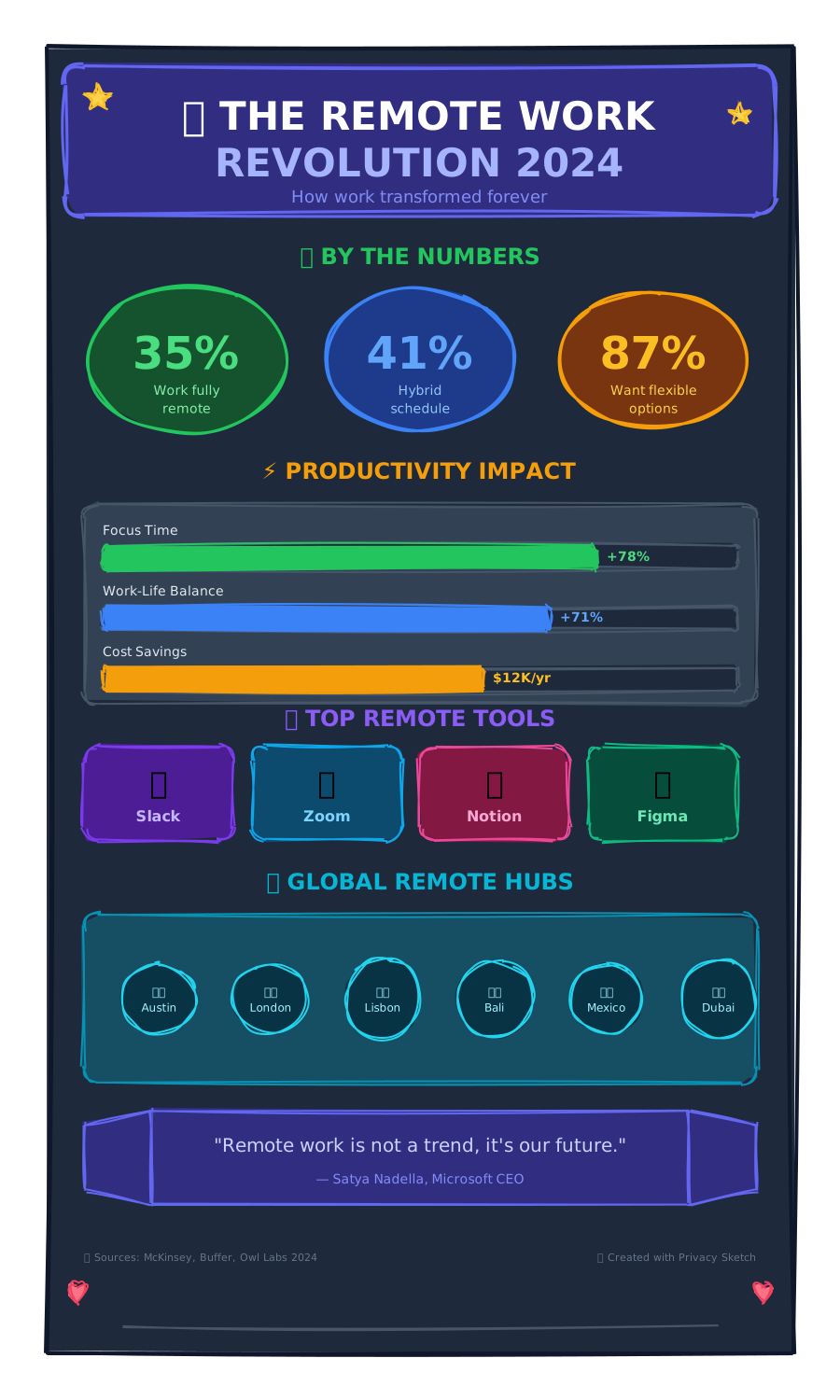
Data Storytelling
Go beyond boxes and arrows. Create engaging infographics with large typography, icon-based statistics, and visual metaphors.
View Tutorial →...and many more, including CI/CD Pipelines, Org Charts, and AI History.
6. Under the Hood: The Tech Stack
For the curious developers reading this, Privacy Sketch leverages modern web standards to achieve its "app-like" performance without any backend.
- Rendering Engine: At its core, we use Rough.js, a lightweight library that lets us draw primitives in a sketchy, hand-drawn style. It converts our abstract shapes into SVG paths with randomized variances.
- Canvas API: We render to an HTML5 Canvas for performance. This allows us to handle huge diagrams with hundreds of elements at 60fps, which would bring a naive DOM-div-based approach to a crawl.
- Service Workers: Privacy Sketch is a Progressive Web App (PWA). Once you visit the site, the service worker caches the core assets, allowing the tool to load instantly and work completely offline.
7. Conclusion
We believe that tools shape the way we think. If your tool is rigid, your thinking becomes rigid. If your tool is open, fluid, and forgiving, your ideas will be too.
Privacy Sketch is our attempt to bring the fluidity of a physical whiteboard to the structured, reproducible world of digital documentation. By combining a privacy-first local architecture with an AI-ready JSON DSL, we hope to set a new standard for how we visualize complex systems.
Whether you are a CTO documenting cloud architecture, a Product Manager mapping user journeys, or a teacher explaining history,Privacy Sketch is your canvas.
Ready to Start Sketching?
No signup required. No credit card. Just pure creativity.
Launch Privacy Sketch Now