HStack, VStack, Grid), relative positioning (position: { below, rightOf, inside }), variables ($varName), and named styles. The hand-computed x/y values in the steps below still work, but the same diagram can be expressed more concisely. See the v2 power features reference, and the modernized version at the bottom of this tutorial.
What You'll Build
Timelines are perfect for showing evolution, historical events, or project milestones. In this tutorial, you'll create a web evolution timeline with:
- A horizontal timeline spine
- Era cards for Web 1.0, 2.0, and 3.0
- Date markers along the timeline
- Technology icons and descriptions
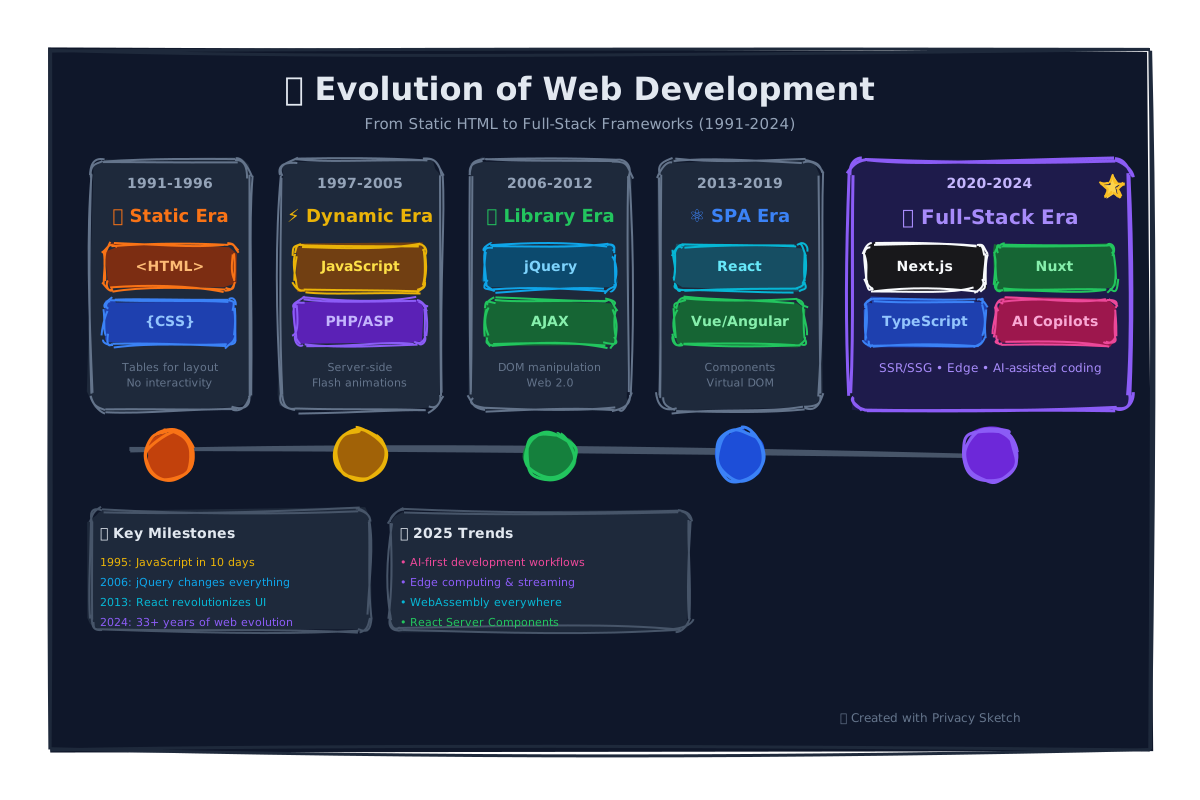
The Timeline Pattern
| Era | Years | Color | Technologies |
|---|---|---|---|
| Web 1.0 | 1991-2004 | Gray/Blue | Static HTML, Tables, Frames |
| Web 2.0 | 2004-2020 | Green/Cyan | AJAX, Social Media, Mobile |
| Web 3.0 | 2020+ | Purple/Pink | Blockchain, AI, Decentralized |
Step 1: Create the Timeline Spine
The spine is a horizontal line that runs through the center of your timeline.
Add the Central Line
{
  "id": "timeline-spine",
  "type": "line",
  "x": 50,
  "y": 400,
  "w": 1200,
  "h": 0,
  "options": {
    "stroke": "slate.400",
    "strokeWidth": 3
  }
}
Step 2: Add Era Markers
Use ellipses or circles as milestone markers along the timeline.
Create Timeline Nodes
// Web 1.0 marker (left)
{
  "id": "marker-web1",
  "type": "ellipse",
  "x": 180,
  "y": 385,
  "w": 30,
  "h": 30,
  "options": {
    "stroke": "blue.500",
    "fill": "blue.500",
    "fillStyle": "solid"
  }
},
// Date label below
{
  "id": "date-1991",
  "type": "text",
  "x": 160,
  "y": 420,
  "w": 70,
  "h": 18,
  "text": "1991",
  "fontSize": 12,
  "fontWeight": "bold",
  "align": "center",
  "options": { "stroke": "slate.600" }
}
Step 3: Add Era Cards
Create content cards above or below the timeline for each era.
Build Era Description Cards
// Web 1.0 card (above the line)
{
  "id": "card-web1",
  "type": "rectangle",
  "x": 100,
  "y": 200,
  "w": 200,
  "h": 150,
  "borderRadius": 12,
  "options": {
    "stroke": "blue.400",
    "fill": "blue.50",
    "fillStyle": "solid"
  }
},
{
  "id": "card-web1-title",
  "type": "text",
  "x": 100,
  "y": 220,
  "w": 200,
  "h": 25,
  "text": "🌐 Web 1.0",
  "fontSize": 18,
  "fontWeight": "bold",
  "align": "center",
  "options": { "stroke": "blue.700" }
},
{
  "id": "card-web1-desc",
  "type": "text",
  "x": 110,
  "y": 250,
  "w": 180,
  "h": 80,
  "text": "Static pages\\nRead-only\\nTables & Frames",
  "fontSize": 12,
  "align": "center",
  "options": { "stroke": "slate.600" }
}
Tip: Alternate cards above and below the timeline for visual balance.
Vertical Connectors
Add short vertical lines connecting each card to its marker on the timeline. This creates a clear visual link between the description and the point in time.
Design Principles for Timelines
- Left to right — Time flows from past (left) to future (right)
- Consistent spacing — Equal gaps between major events
- Color progression — Use warmer/brighter colors for more recent eras
- Alternating cards — Above/below prevents crowding
- Date labels — Always include clear year/date markers
v2 Modernized Version
Full web-evolution timeline: 4 era band headers spanning their date ranges, 8 alternating event cards (4 above the spine, 4 below) with year + event + key tech, and a tech-stack-per-era footer strip. Demonstrates era bands as wide background rectangles, alternating HStacks above/below a central spine, and per-era styles.
{
  "version": "2.0",
  "canvas": { "width": 1600, "height": 900, "background": "cream", "padding": 0 },
  "theme": { "roughness": 1.3, "bowing": 1.0, "fillStyle": "hachure", "fontFamily": "Comic Sans MS" },

  "vars": { "cardW": 200, "cardH": 130, "stackW": 360, "stackH": 110 },

  "styles": {
    "band":      { "strokeWidth": 0, "fillStyle": "solid", "stroke": "transparent" },
    "band-1":    { "extends": "band", "fill": "blue.100" },
    "band-2":    { "extends": "band", "fill": "green.100" },
    "band-3":    { "extends": "band", "fill": "amber.100" },
    "band-4":    { "extends": "band", "fill": "purple.100" },
    "card":      { "fill": "white",    "fillStyle": "solid", "strokeWidth": 2 },
    "era-1":     { "extends": "card",  "stroke": "blue.700" },
    "era-2":     { "extends": "card",  "stroke": "green.700" },
    "era-3":     { "extends": "card",  "stroke": "amber.700" },
    "era-4":     { "extends": "card",  "stroke": "purple.700" },
    "stack":     { "fill": "slate.50", "stroke": "slate.700", "strokeWidth": 2, "fillStyle": "solid" }
  },

  "elements": [
    { "id": "title", "type": "text", "x": 0, "y": 25, "w": 1600, "h": 38, "text": "Web Evolution · 1990 → 2024", "fontSize": 28, "fontWeight": "bold", "align": "center" },
    { "id": "sub",   "type": "text", "x": 0, "y": 68, "w": 1600, "h": 22, "text": "Four eras of the open web · the breakthroughs, the tech stacks, and the players", "fontSize": 14, "align": "center" },

    { "id": "bg1", "type": "rectangle", "style": "band-1", "x": 60,   "y": 130, "w": 360, "h": 40 },
    { "id": "bg2", "type": "rectangle", "style": "band-2", "x": 420,  "y": 130, "w": 380, "h": 40 },
    { "id": "bg3", "type": "rectangle", "style": "band-3", "x": 800,  "y": 130, "w": 380, "h": 40 },
    { "id": "bg4", "type": "rectangle", "style": "band-4", "x": 1180, "y": 130, "w": 360, "h": 40 },
    { "id": "bg1-t", "type": "text", "position": { "inside": "#bg1", "align": "center", "padding": 8 }, "w": 360, "h": 24, "text": "Web 1.0 · Read-only (1990–99)",       "fontSize": 14, "fontWeight": "bold", "align": "center" },
    { "id": "bg2-t", "type": "text", "position": { "inside": "#bg2", "align": "center", "padding": 8 }, "w": 380, "h": 24, "text": "Web 2.0 · Read-write (1999–2010)",   "fontSize": 14, "fontWeight": "bold", "align": "center" },
    { "id": "bg3-t", "type": "text", "position": { "inside": "#bg3", "align": "center", "padding": 8 }, "w": 380, "h": 24, "text": "Mobile-first · Cloud (2010–2020)",  "fontSize": 14, "fontWeight": "bold", "align": "center" },
    { "id": "bg4-t", "type": "text", "position": { "inside": "#bg4", "align": "center", "padding": 8 }, "w": 360, "h": 24, "text": "AI-native web (2020–present)",       "fontSize": 14, "fontWeight": "bold", "align": "center" },

    { "type": "HStack", "x": 80, "y": 210, "gap": 180, "children": [
      { "id": "ev1", "type": "rectangle", "style": "era-1", "w": "$cardW", "h": "$cardH", "borderRadius": 12 },
      { "id": "ev3", "type": "rectangle", "style": "era-2", "w": "$cardW", "h": "$cardH", "borderRadius": 12 },
      { "id": "ev5", "type": "rectangle", "style": "era-3", "w": "$cardW", "h": "$cardH", "borderRadius": 12 },
      { "id": "ev7", "type": "rectangle", "style": "era-4", "w": "$cardW", "h": "$cardH", "borderRadius": 12 }
    ]},
    { "id": "ev1-y", "type": "text", "position": { "inside": "#ev1", "align": "top-center",    "padding": 10 }, "w": 200, "h": 26, "text": "1991", "fontSize": 18, "fontWeight": "bold", "align": "center" },
    { "id": "ev1-t", "type": "text", "position": { "inside": "#ev1", "align": "center",        "padding": 14 }, "w": 200, "h": 28, "text": "WWW invented",             "fontSize": 13, "fontWeight": "bold", "align": "center" },
    { "id": "ev1-b", "type": "text", "position": { "inside": "#ev1", "align": "bottom-center", "padding": 12 }, "w": 200, "h": 36, "text": "Tim Berners-Lee · CERN\nHTML 1, HTTP 0.9", "fontSize": 11, "align": "center" },
    { "id": "ev3-y", "type": "text", "position": { "inside": "#ev3", "align": "top-center",    "padding": 10 }, "w": 200, "h": 26, "text": "2004", "fontSize": 18, "fontWeight": "bold", "align": "center" },
    { "id": "ev3-t", "type": "text", "position": { "inside": "#ev3", "align": "center",        "padding": 14 }, "w": 200, "h": 28, "text": "Web 2.0 + AJAX",           "fontSize": 13, "fontWeight": "bold", "align": "center" },
    { "id": "ev3-b", "type": "text", "position": { "inside": "#ev3", "align": "bottom-center", "padding": 12 }, "w": 200, "h": 36, "text": "Gmail, Flickr launch\nXMLHttpRequest goes mainstream", "fontSize": 11, "align": "center" },
    { "id": "ev5-y", "type": "text", "position": { "inside": "#ev5", "align": "top-center",    "padding": 10 }, "w": 200, "h": 26, "text": "2012", "fontSize": 18, "fontWeight": "bold", "align": "center" },
    { "id": "ev5-t", "type": "text", "position": { "inside": "#ev5", "align": "center",        "padding": 14 }, "w": 200, "h": 28, "text": "SPA + React",              "fontSize": 13, "fontWeight": "bold", "align": "center" },
    { "id": "ev5-b", "type": "text", "position": { "inside": "#ev5", "align": "bottom-center", "padding": 12 }, "w": 200, "h": 36, "text": "React released\nClient-rendered apps everywhere", "fontSize": 11, "align": "center" },
    { "id": "ev7-y", "type": "text", "position": { "inside": "#ev7", "align": "top-center",    "padding": 10 }, "w": 200, "h": 26, "text": "2022", "fontSize": 18, "fontWeight": "bold", "align": "center" },
    { "id": "ev7-t", "type": "text", "position": { "inside": "#ev7", "align": "center",        "padding": 14 }, "w": 200, "h": 28, "text": "LLM-native web",           "fontSize": 13, "fontWeight": "bold", "align": "center" },
    { "id": "ev7-b", "type": "text", "position": { "inside": "#ev7", "align": "bottom-center", "padding": 12 }, "w": 200, "h": 36, "text": "ChatGPT launch\nLLMs in IDEs, browsers, search", "fontSize": 11, "align": "center" },

    { "id": "spine", "type": "line", "x": 60, "y": 410, "w": 1480, "h": 0, "options": { "stroke": "slate.500", "strokeWidth": 3 } },

    { "type": "HStack", "x": 280, "y": 450, "gap": 180, "children": [
      { "id": "ev2", "type": "rectangle", "style": "era-1", "w": "$cardW", "h": "$cardH", "borderRadius": 12 },
      { "id": "ev4", "type": "rectangle", "style": "era-2", "w": "$cardW", "h": "$cardH", "borderRadius": 12 },
      { "id": "ev6", "type": "rectangle", "style": "era-3", "w": "$cardW", "h": "$cardH", "borderRadius": 12 },
      { "id": "ev8", "type": "rectangle", "style": "era-4", "w": "$cardW", "h": "$cardH", "borderRadius": 12 }
    ]},
    { "id": "ev2-y", "type": "text", "position": { "inside": "#ev2", "align": "top-center",    "padding": 10 }, "w": 200, "h": 26, "text": "1998", "fontSize": 18, "fontWeight": "bold", "align": "center" },
    { "id": "ev2-t", "type": "text", "position": { "inside": "#ev2", "align": "center",        "padding": 14 }, "w": 200, "h": 28, "text": "Google search",            "fontSize": 13, "fontWeight": "bold", "align": "center" },
    { "id": "ev2-b", "type": "text", "position": { "inside": "#ev2", "align": "bottom-center", "padding": 12 }, "w": 200, "h": 36, "text": "PageRank · Stanford\nIndex of the open web", "fontSize": 11, "align": "center" },
    { "id": "ev4-y", "type": "text", "position": { "inside": "#ev4", "align": "top-center",    "padding": 10 }, "w": 200, "h": 26, "text": "2007", "fontSize": 18, "fontWeight": "bold", "align": "center" },
    { "id": "ev4-t", "type": "text", "position": { "inside": "#ev4", "align": "center",        "padding": 14 }, "w": 200, "h": 28, "text": "iPhone · mobile web",       "fontSize": 13, "fontWeight": "bold", "align": "center" },
    { "id": "ev4-b", "type": "text", "position": { "inside": "#ev4", "align": "bottom-center", "padding": 12 }, "w": 200, "h": 36, "text": "Mobile Safari ships\nResponsive design era begins", "fontSize": 11, "align": "center" },
    { "id": "ev6-y", "type": "text", "position": { "inside": "#ev6", "align": "top-center",    "padding": 10 }, "w": 200, "h": 26, "text": "2014", "fontSize": 18, "fontWeight": "bold", "align": "center" },
    { "id": "ev6-t", "type": "text", "position": { "inside": "#ev6", "align": "center",        "padding": 14 }, "w": 200, "h": 28, "text": "PWA + Service Workers",     "fontSize": 13, "fontWeight": "bold", "align": "center" },
    { "id": "ev6-b", "type": "text", "position": { "inside": "#ev6", "align": "bottom-center", "padding": 12 }, "w": 200, "h": 36, "text": "Offline-first apps\nWeb push, install prompts", "fontSize": 11, "align": "center" },
    { "id": "ev8-y", "type": "text", "position": { "inside": "#ev8", "align": "top-center",    "padding": 10 }, "w": 200, "h": 26, "text": "2024", "fontSize": 18, "fontWeight": "bold", "align": "center" },
    { "id": "ev8-t", "type": "text", "position": { "inside": "#ev8", "align": "center",        "padding": 14 }, "w": 200, "h": 28, "text": "Agentic + tool use",        "fontSize": 13, "fontWeight": "bold", "align": "center" },
    { "id": "ev8-b", "type": "text", "position": { "inside": "#ev8", "align": "bottom-center", "padding": 12 }, "w": 200, "h": 36, "text": "Browser-resident agents\nMCP, tool-using assistants", "fontSize": 11, "align": "center" },

    { "id": "t1", "type": "line", "x": "=ev1.centerX", "y": "=ev1.bottom", "w": 0, "h": "=spine.y - ev1.bottom", "options": { "stroke": "blue.500",   "strokeWidth": 2 } },
    { "id": "t2", "type": "line", "x": "=ev2.centerX", "y": "=spine.y",    "w": 0, "h": "=ev2.y - spine.y",       "options": { "stroke": "blue.500",   "strokeWidth": 2 } },
    { "id": "t3", "type": "line", "x": "=ev3.centerX", "y": "=ev3.bottom", "w": 0, "h": "=spine.y - ev3.bottom", "options": { "stroke": "green.500",  "strokeWidth": 2 } },
    { "id": "t4", "type": "line", "x": "=ev4.centerX", "y": "=spine.y",    "w": 0, "h": "=ev4.y - spine.y",       "options": { "stroke": "green.500",  "strokeWidth": 2 } },
    { "id": "t5", "type": "line", "x": "=ev5.centerX", "y": "=ev5.bottom", "w": 0, "h": "=spine.y - ev5.bottom", "options": { "stroke": "amber.500",  "strokeWidth": 2 } },
    { "id": "t6", "type": "line", "x": "=ev6.centerX", "y": "=spine.y",    "w": 0, "h": "=ev6.y - spine.y",       "options": { "stroke": "amber.500",  "strokeWidth": 2 } },
    { "id": "t7", "type": "line", "x": "=ev7.centerX", "y": "=ev7.bottom", "w": 0, "h": "=spine.y - ev7.bottom", "options": { "stroke": "purple.500", "strokeWidth": 2 } },
    { "id": "t8", "type": "line", "x": "=ev8.centerX", "y": "=spine.y",    "w": 0, "h": "=ev8.y - spine.y",       "options": { "stroke": "purple.500", "strokeWidth": 2 } },

    { "id": "stack-h", "type": "text", "x": 60, "y": 660, "w": 1480, "h": 24, "text": "Tech stack per era", "fontSize": 16, "fontWeight": "bold" },
    { "type": "HStack", "x": 80, "y": 700, "gap": 24, "children": [
      { "id": "s1", "type": "rectangle", "style": "stack", "w": "$stackW", "h": "$stackH", "borderRadius": 12 },
      { "id": "s2", "type": "rectangle", "style": "stack", "w": "$stackW", "h": "$stackH", "borderRadius": 12 },
      { "id": "s3", "type": "rectangle", "style": "stack", "w": "$stackW", "h": "$stackH", "borderRadius": 12 },
      { "id": "s4", "type": "rectangle", "style": "stack", "w": "$stackW", "h": "$stackH", "borderRadius": 12 }
    ]},
    { "id": "s1-h", "type": "text", "position": { "inside": "#s1", "align": "top-center", "padding": 12 }, "w": 360, "h": 22, "text": "Web 1.0", "fontSize": 14, "fontWeight": "bold", "align": "center" },
    { "id": "s1-b", "type": "text", "position": { "inside": "#s1", "align": "center",     "padding": 14 }, "w": 360, "h": 60, "text": "HTML, HTTP, GIF, table layouts, frames, server-side Perl/PHP, dial-up", "fontSize": 12, "align": "center" },
    { "id": "s2-h", "type": "text", "position": { "inside": "#s2", "align": "top-center", "padding": 12 }, "w": 360, "h": 22, "text": "Web 2.0", "fontSize": 14, "fontWeight": "bold", "align": "center" },
    { "id": "s2-b", "type": "text", "position": { "inside": "#s2", "align": "center",     "padding": 14 }, "w": 360, "h": 60, "text": "jQuery, AJAX, RSS, blogs, JSON APIs, REST, Ruby on Rails, broadband", "fontSize": 12, "align": "center" },
    { "id": "s3-h", "type": "text", "position": { "inside": "#s3", "align": "top-center", "padding": 12 }, "w": 360, "h": 22, "text": "Mobile / Cloud", "fontSize": 14, "fontWeight": "bold", "align": "center" },
    { "id": "s3-b", "type": "text", "position": { "inside": "#s3", "align": "center",     "padding": 14 }, "w": 360, "h": 60, "text": "React, GraphQL, Docker, K8s, serverless, CDN-first, S3, Lambda", "fontSize": 12, "align": "center" },
    { "id": "s4-h", "type": "text", "position": { "inside": "#s4", "align": "top-center", "padding": 12 }, "w": 360, "h": 22, "text": "AI-native", "fontSize": 14, "fontWeight": "bold", "align": "center" },
    { "id": "s4-b", "type": "text", "position": { "inside": "#s4", "align": "center",     "padding": 14 }, "w": 360, "h": 60, "text": "LLMs, RAG, embeddings, vector DBs, tool use, MCP, browser agents", "fontSize": 12, "align": "center" }
  ]
}
Showcase: 4 era bands + 8 alternating event cards + central spine + per-era tick lines (lengths computed from =spine.y - card.bottom) + a tech-stack footer row. ~75 elements using 11 named styles.
📅 Create Your Timeline
Open Privacy Sketch and document your project's evolution or historical research.
Open Privacy SketchNext Steps
- History of AI Tutorial — Educational timeline example
- Remote Work Infographic — Data visualization
- LLM Reference — Technical documentation