HStack, VStack, Grid), relative positioning (position: { below, rightOf, inside }), variables ($varName), and named styles. The hand-computed x/y values in the steps below still work, but the same diagram can be expressed more concisely. See the v2 power features reference, and the modernized version at the bottom of this tutorial.
What You'll Build
Educational timelines help visualize historical progress. You'll create an AI history timeline with:
- Milestone cards for key AI breakthroughs
- Year markers along the timeline
- Color-coded eras (early AI, AI winter, modern AI)
- Icons representing different types of achievements
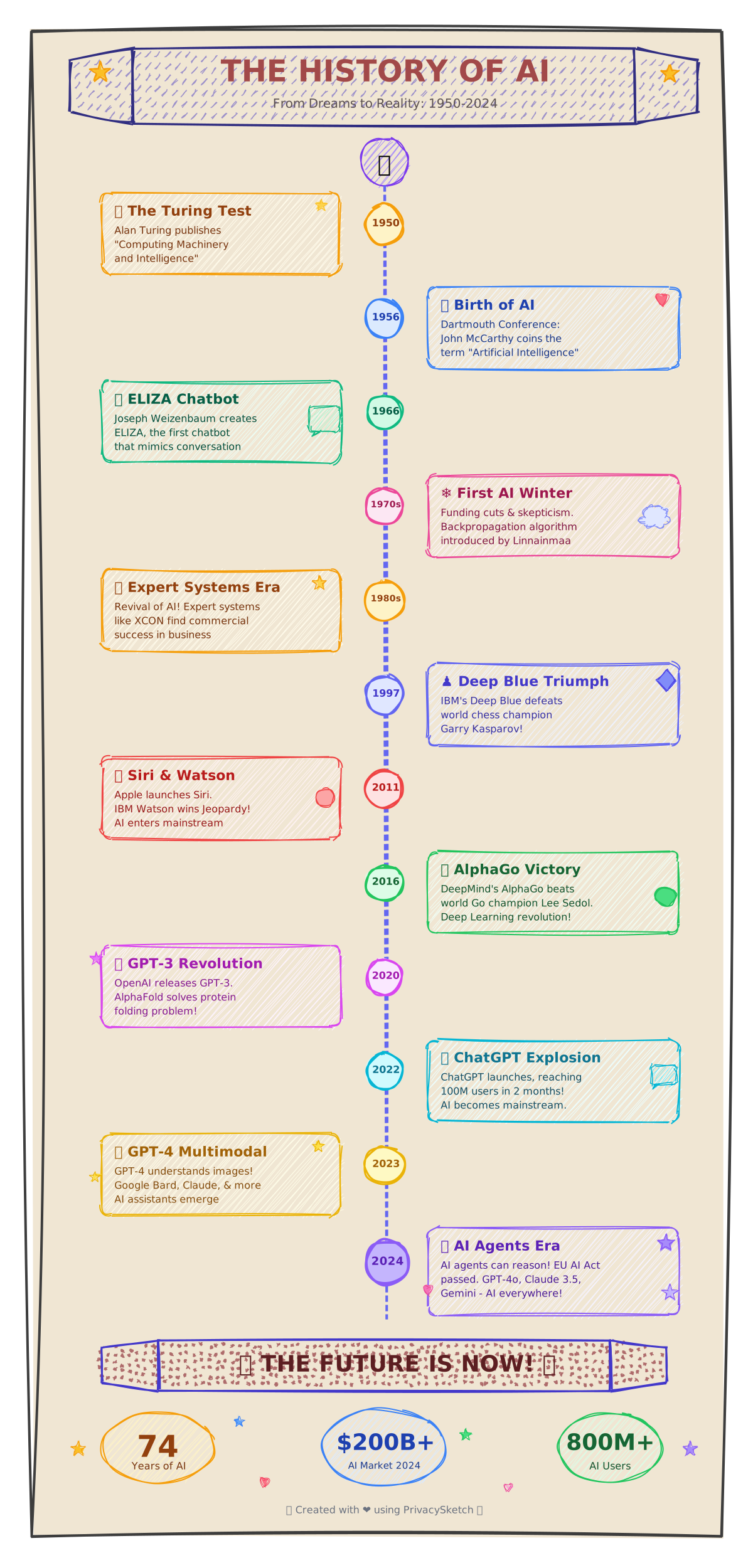
Key AI Milestones
| Year | Milestone | Color |
|---|---|---|
| 1950 | Turing Test proposed | Blue (foundations) |
| 1956 | Dartmouth Conference | Blue (foundations) |
| 1997 | Deep Blue beats Kasparov | Green (chess) |
| 2012 | AlexNet / Deep Learning | Purple (vision) |
| 2022 | ChatGPT Launch | Pink (LLMs) |
Step 1: Create Timeline Milestones
Add Milestone Cards
{
  "id": "milestone-1950",
  "type": "rectangle",
  "x": 100, "y": 150, "w": 180, "h": 100,
  "borderRadius": 12,
  "options": { "stroke": "blue.500", "fill": "blue.50", "fillStyle": "solid" }
},
{
  "id": "milestone-1950-year",
  "type": "text",
  "x": 100, "y": 165, "w": 180, "h": 20,
  "text": "1950",
  "fontSize": 14,
  "fontWeight": "bold",
  "align": "center",
  "options": { "stroke": "blue.600" }
},
{
  "id": "milestone-1950-title",
  "type": "text",
  "x": 100, "y": 195, "w": 180, "h": 40,
  "text": "🧠 Turing Test\\nProposed",
  "fontSize": 13,
  "align": "center",
  "options": { "stroke": "slate.700" }
}
Step 2: Connect with Timeline Spine
Add Horizontal Timeline
{
  "id": "timeline",
  "type": "line",
  "x": 50, "y": 300, "w": 1100, "h": 0,
  "options": { "stroke": "slate.400", "strokeWidth": 3 }
}
// Add vertical connector lines from each card to the timeline
Design Tips for Educational Timelines
- Era colors — Group related milestones by color
- Icons/emojis — Use relevant symbols (🧠🤖💡)
- Spacing — More important events can have larger cards
- Alternating — Place cards above/below timeline
v2 Modernized Version
Vertical AI history timeline: 5 era section headers stacked top-to-bottom, each followed by 2 milestone rows. Each row is an HStack of a year circle and a content card. Era headers and card borders share era colours via named styles with extends. Connector lines use expressions so the year circle anchor stays in sync with its card.
{
  "version": "2.0",
  "canvas": { "width": 1100, "height": 1920, "background": "cream", "padding": 0 },
  "theme": { "roughness": 1.3, "bowing": 1.0, "fillStyle": "hachure", "fontFamily": "Comic Sans MS" },

  "vars": { "yearW": 90, "cardW": 820, "cardH": 110 },

  "styles": {
    "era":   { "strokeWidth": 0, "fillStyle": "solid", "stroke": "transparent" },
    "era-1": { "extends": "era", "fill": "blue.200" },
    "era-2": { "extends": "era", "fill": "slate.300" },
    "era-3": { "extends": "era", "fill": "green.200" },
    "era-4": { "extends": "era", "fill": "purple.200" },
    "era-5": { "extends": "era", "fill": "pink.200" },
    "year":  { "fill": "white", "fillStyle": "solid", "strokeWidth": 3 },
    "yr-1":  { "extends": "year", "stroke": "blue.700" },
    "yr-2":  { "extends": "year", "stroke": "slate.700" },
    "yr-3":  { "extends": "year", "stroke": "green.700" },
    "yr-4":  { "extends": "year", "stroke": "purple.700" },
    "yr-5":  { "extends": "year", "stroke": "pink.700" },
    "card":  { "fill": "white", "fillStyle": "solid", "strokeWidth": 2 },
    "cd-1":  { "extends": "card", "stroke": "blue.700" },
    "cd-2":  { "extends": "card", "stroke": "slate.700" },
    "cd-3":  { "extends": "card", "stroke": "green.700" },
    "cd-4":  { "extends": "card", "stroke": "purple.700" },
    "cd-5":  { "extends": "card", "stroke": "pink.700" },
    "edge":  { "stroke": "slate.500", "strokeWidth": 2, "fill": "transparent" }
  },

  "elements": [
    { "id": "title", "type": "text", "x": 0, "y": 30, "w": 1100, "h": 38, "text": "70 Years of Artificial Intelligence", "fontSize": 28, "fontWeight": "bold", "align": "center" },
    { "id": "sub",   "type": "text", "x": 0, "y": 72, "w": 1100, "h": 22, "text": "Five eras · ten breakthroughs · the people behind each one", "fontSize": 14, "align": "center" },

    { "id": "h1",   "type": "rectangle", "style": "era-1", "x": 60, "y": 130, "w": 980, "h": 50, "borderRadius": 10 },
    { "id": "h1-t", "type": "text", "position": { "inside": "#h1", "align": "center" }, "w": 980, "h": 26, "text": "Symbolic AI · 1950 – 1970", "fontSize": 18, "fontWeight": "bold", "align": "center" },

    { "type": "HStack", "x": 80, "y": 210, "gap": 20, "align": "center", "children": [
      { "id": "y1", "type": "ellipse",   "style": "yr-1", "w": "$yearW", "h": "$yearW" },
      { "id": "c1", "type": "rectangle", "style": "cd-1", "w": "$cardW", "h": "$cardH", "borderRadius": 12 }
    ]},
    { "id": "y1-t", "type": "text", "position": { "inside": "#y1", "align": "center" }, "w": 90, "h": 24, "text": "1950", "fontSize": 16, "fontWeight": "bold", "align": "center" },
    { "id": "c1-h", "type": "text", "position": { "inside": "#c1", "align": "top-center",    "padding": 14 }, "w": 800, "h": 28, "text": "Turing Test proposed", "fontSize": 18, "fontWeight": "bold", "align": "left" },
    { "id": "c1-b", "type": "text", "position": { "inside": "#c1", "align": "bottom-center", "padding": 14 }, "w": 800, "h": 44, "text": "Alan Turing · Computing Machinery and Intelligence · \"Can machines think?\"", "fontSize": 13, "align": "left", "fontStyle": "italic" },
    { "id": "ln1", "type": "line", "style": "edge", "x": "=y1.right", "y": "=y1.centerY", "w": "=c1.x - y1.right", "h": 0 },

    { "type": "HStack", "x": 80, "y": 340, "gap": 20, "align": "center", "children": [
      { "id": "y2", "type": "ellipse",   "style": "yr-1", "w": "$yearW", "h": "$yearW" },
      { "id": "c2", "type": "rectangle", "style": "cd-1", "w": "$cardW", "h": "$cardH", "borderRadius": 12 }
    ]},
    { "id": "y2-t", "type": "text", "position": { "inside": "#y2", "align": "center" }, "w": 90, "h": 24, "text": "1956", "fontSize": 16, "fontWeight": "bold", "align": "center" },
    { "id": "c2-h", "type": "text", "position": { "inside": "#c2", "align": "top-center",    "padding": 14 }, "w": 800, "h": 28, "text": "Dartmouth Workshop · the field of AI is founded", "fontSize": 18, "fontWeight": "bold", "align": "left" },
    { "id": "c2-b", "type": "text", "position": { "inside": "#c2", "align": "bottom-center", "padding": 14 }, "w": 800, "h": 44, "text": "McCarthy, Minsky, Shannon, Rochester · the term \"artificial intelligence\" is coined", "fontSize": 13, "align": "left", "fontStyle": "italic" },
    { "id": "ln2", "type": "line", "style": "edge", "x": "=y2.right", "y": "=y2.centerY", "w": "=c2.x - y2.right", "h": 0 },

    { "id": "h2",   "type": "rectangle", "style": "era-2", "x": 60, "y": 480, "w": 980, "h": 50, "borderRadius": 10 },
    { "id": "h2-t", "type": "text", "position": { "inside": "#h2", "align": "center" }, "w": 980, "h": 26, "text": "AI Winter · 1970 – 1995", "fontSize": 18, "fontWeight": "bold", "align": "center" },

    { "type": "HStack", "x": 80, "y": 560, "gap": 20, "align": "center", "children": [
      { "id": "y3", "type": "ellipse",   "style": "yr-2", "w": "$yearW", "h": "$yearW" },
      { "id": "c3", "type": "rectangle", "style": "cd-2", "w": "$cardW", "h": "$cardH", "borderRadius": 12 }
    ]},
    { "id": "y3-t", "type": "text", "position": { "inside": "#y3", "align": "center" }, "w": 90, "h": 24, "text": "1973", "fontSize": 16, "fontWeight": "bold", "align": "center" },
    { "id": "c3-h", "type": "text", "position": { "inside": "#c3", "align": "top-center",    "padding": 14 }, "w": 800, "h": 28, "text": "Lighthill Report · funding cut, AI winter begins", "fontSize": 18, "fontWeight": "bold", "align": "left" },
    { "id": "c3-b", "type": "text", "position": { "inside": "#c3", "align": "bottom-center", "padding": 14 }, "w": 800, "h": 44, "text": "James Lighthill · UK Science Research Council · symbolic AI fails to deliver promised general intelligence", "fontSize": 13, "align": "left", "fontStyle": "italic" },
    { "id": "ln3", "type": "line", "style": "edge", "x": "=y3.right", "y": "=y3.centerY", "w": "=c3.x - y3.right", "h": 0 },

    { "type": "HStack", "x": 80, "y": 690, "gap": 20, "align": "center", "children": [
      { "id": "y4", "type": "ellipse",   "style": "yr-2", "w": "$yearW", "h": "$yearW" },
      { "id": "c4", "type": "rectangle", "style": "cd-2", "w": "$cardW", "h": "$cardH", "borderRadius": 12 }
    ]},
    { "id": "y4-t", "type": "text", "position": { "inside": "#y4", "align": "center" }, "w": 90, "h": 24, "text": "1986", "fontSize": 16, "fontWeight": "bold", "align": "center" },
    { "id": "c4-h", "type": "text", "position": { "inside": "#c4", "align": "top-center",    "padding": 14 }, "w": 800, "h": 28, "text": "Backpropagation popularized", "fontSize": 18, "fontWeight": "bold", "align": "left" },
    { "id": "c4-b", "type": "text", "position": { "inside": "#c4", "align": "bottom-center", "padding": 14 }, "w": 800, "h": 44, "text": "Rumelhart, Hinton, Williams · training multi-layer networks becomes practical, but compute and data still limit them", "fontSize": 13, "align": "left", "fontStyle": "italic" },
    { "id": "ln4", "type": "line", "style": "edge", "x": "=y4.right", "y": "=y4.centerY", "w": "=c4.x - y4.right", "h": 0 },

    { "id": "h3",   "type": "rectangle", "style": "era-3", "x": 60, "y": 830, "w": 980, "h": 50, "borderRadius": 10 },
    { "id": "h3-t", "type": "text", "position": { "inside": "#h3", "align": "center" }, "w": 980, "h": 26, "text": "Statistical ML · 1995 – 2010", "fontSize": 18, "fontWeight": "bold", "align": "center" },

    { "type": "HStack", "x": 80, "y": 910, "gap": 20, "align": "center", "children": [
      { "id": "y5", "type": "ellipse",   "style": "yr-3", "w": "$yearW", "h": "$yearW" },
      { "id": "c5", "type": "rectangle", "style": "cd-3", "w": "$cardW", "h": "$cardH", "borderRadius": 12 }
    ]},
    { "id": "y5-t", "type": "text", "position": { "inside": "#y5", "align": "center" }, "w": 90, "h": 24, "text": "1997", "fontSize": 16, "fontWeight": "bold", "align": "center" },
    { "id": "c5-h", "type": "text", "position": { "inside": "#c5", "align": "top-center",    "padding": 14 }, "w": 800, "h": 28, "text": "Deep Blue defeats Kasparov", "fontSize": 18, "fontWeight": "bold", "align": "left" },
    { "id": "c5-b", "type": "text", "position": { "inside": "#c5", "align": "bottom-center", "padding": 14 }, "w": 800, "h": 44, "text": "IBM · brute-force search of 200 million positions per second beats the reigning world chess champion 3.5–2.5", "fontSize": 13, "align": "left", "fontStyle": "italic" },
    { "id": "ln5", "type": "line", "style": "edge", "x": "=y5.right", "y": "=y5.centerY", "w": "=c5.x - y5.right", "h": 0 },

    { "type": "HStack", "x": 80, "y": 1040, "gap": 20, "align": "center", "children": [
      { "id": "y6", "type": "ellipse",   "style": "yr-3", "w": "$yearW", "h": "$yearW" },
      { "id": "c6", "type": "rectangle", "style": "cd-3", "w": "$cardW", "h": "$cardH", "borderRadius": 12 }
    ]},
    { "id": "y6-t", "type": "text", "position": { "inside": "#y6", "align": "center" }, "w": 90, "h": 24, "text": "2006", "fontSize": 16, "fontWeight": "bold", "align": "center" },
    { "id": "c6-h", "type": "text", "position": { "inside": "#c6", "align": "top-center",    "padding": 14 }, "w": 800, "h": 28, "text": "Deep belief networks", "fontSize": 18, "fontWeight": "bold", "align": "left" },
    { "id": "c6-b", "type": "text", "position": { "inside": "#c6", "align": "bottom-center", "padding": 14 }, "w": 800, "h": 44, "text": "Hinton, Salakhutdinov · greedy layer-wise pretraining reignites interest in deep neural networks", "fontSize": 13, "align": "left", "fontStyle": "italic" },
    { "id": "ln6", "type": "line", "style": "edge", "x": "=y6.right", "y": "=y6.centerY", "w": "=c6.x - y6.right", "h": 0 },

    { "id": "h4",   "type": "rectangle", "style": "era-4", "x": 60, "y": 1180, "w": 980, "h": 50, "borderRadius": 10 },
    { "id": "h4-t", "type": "text", "position": { "inside": "#h4", "align": "center" }, "w": 980, "h": 26, "text": "Deep Learning · 2010 – 2020", "fontSize": 18, "fontWeight": "bold", "align": "center" },

    { "type": "HStack", "x": 80, "y": 1260, "gap": 20, "align": "center", "children": [
      { "id": "y7", "type": "ellipse",   "style": "yr-4", "w": "$yearW", "h": "$yearW" },
      { "id": "c7", "type": "rectangle", "style": "cd-4", "w": "$cardW", "h": "$cardH", "borderRadius": 12 }
    ]},
    { "id": "y7-t", "type": "text", "position": { "inside": "#y7", "align": "center" }, "w": 90, "h": 24, "text": "2012", "fontSize": 16, "fontWeight": "bold", "align": "center" },
    { "id": "c7-h", "type": "text", "position": { "inside": "#c7", "align": "top-center",    "padding": 14 }, "w": 800, "h": 28, "text": "AlexNet wins ImageNet", "fontSize": 18, "fontWeight": "bold", "align": "left" },
    { "id": "c7-b", "type": "text", "position": { "inside": "#c7", "align": "bottom-center", "padding": 14 }, "w": 800, "h": 44, "text": "Krizhevsky, Sutskever, Hinton · GPU-trained CNN crushes the field by 10 percentage points, kicking off the deep learning era", "fontSize": 13, "align": "left", "fontStyle": "italic" },
    { "id": "ln7", "type": "line", "style": "edge", "x": "=y7.right", "y": "=y7.centerY", "w": "=c7.x - y7.right", "h": 0 },

    { "type": "HStack", "x": 80, "y": 1390, "gap": 20, "align": "center", "children": [
      { "id": "y8", "type": "ellipse",   "style": "yr-4", "w": "$yearW", "h": "$yearW" },
      { "id": "c8", "type": "rectangle", "style": "cd-4", "w": "$cardW", "h": "$cardH", "borderRadius": 12 }
    ]},
    { "id": "y8-t", "type": "text", "position": { "inside": "#y8", "align": "center" }, "w": 90, "h": 24, "text": "2017", "fontSize": 16, "fontWeight": "bold", "align": "center" },
    { "id": "c8-h", "type": "text", "position": { "inside": "#c8", "align": "top-center",    "padding": 14 }, "w": 800, "h": 28, "text": "Transformers · \"Attention is all you need\"", "fontSize": 18, "fontWeight": "bold", "align": "left" },
    { "id": "c8-b", "type": "text", "position": { "inside": "#c8", "align": "bottom-center", "padding": 14 }, "w": 800, "h": 44, "text": "Vaswani et al. · self-attention replaces recurrence, becoming the foundation of every modern language model", "fontSize": 13, "align": "left", "fontStyle": "italic" },
    { "id": "ln8", "type": "line", "style": "edge", "x": "=y8.right", "y": "=y8.centerY", "w": "=c8.x - y8.right", "h": 0 },

    { "id": "h5",   "type": "rectangle", "style": "era-5", "x": 60, "y": 1530, "w": 980, "h": 50, "borderRadius": 10 },
    { "id": "h5-t", "type": "text", "position": { "inside": "#h5", "align": "center" }, "w": 980, "h": 26, "text": "Foundation Models · 2020 → present", "fontSize": 18, "fontWeight": "bold", "align": "center" },

    { "type": "HStack", "x": 80, "y": 1610, "gap": 20, "align": "center", "children": [
      { "id": "y9", "type": "ellipse",   "style": "yr-5", "w": "$yearW", "h": "$yearW" },
      { "id": "c9", "type": "rectangle", "style": "cd-5", "w": "$cardW", "h": "$cardH", "borderRadius": 12 }
    ]},
    { "id": "y9-t", "type": "text", "position": { "inside": "#y9", "align": "center" }, "w": 90, "h": 24, "text": "2022", "fontSize": 16, "fontWeight": "bold", "align": "center" },
    { "id": "c9-h", "type": "text", "position": { "inside": "#c9", "align": "top-center",    "padding": 14 }, "w": 800, "h": 28, "text": "ChatGPT · LLMs reach 100M users in 60 days", "fontSize": 18, "fontWeight": "bold", "align": "left" },
    { "id": "c9-b", "type": "text", "position": { "inside": "#c9", "align": "bottom-center", "padding": 14 }, "w": 800, "h": 44, "text": "OpenAI · the public meets a language model that holds a conversation; mainstream AI awareness ignites overnight", "fontSize": 13, "align": "left", "fontStyle": "italic" },
    { "id": "ln9", "type": "line", "style": "edge", "x": "=y9.right", "y": "=y9.centerY", "w": "=c9.x - y9.right", "h": 0 },

    { "type": "HStack", "x": 80, "y": 1740, "gap": 20, "align": "center", "children": [
      { "id": "y10", "type": "ellipse",   "style": "yr-5", "w": "$yearW", "h": "$yearW" },
      { "id": "c10", "type": "rectangle", "style": "cd-5", "w": "$cardW", "h": "$cardH", "borderRadius": 12 }
    ]},
    { "id": "y10-t", "type": "text", "position": { "inside": "#y10", "align": "center" }, "w": 90, "h": 24, "text": "2024", "fontSize": 16, "fontWeight": "bold", "align": "center" },
    { "id": "c10-h", "type": "text", "position": { "inside": "#c10", "align": "top-center",    "padding": 14 }, "w": 800, "h": 28, "text": "Agentic AI · tool use, multi-step reasoning", "fontSize": 18, "fontWeight": "bold", "align": "left" },
    { "id": "c10-b", "type": "text", "position": { "inside": "#c10", "align": "bottom-center", "padding": 14 }, "w": 800, "h": 44, "text": "Claude, GPT-4o, Gemini · models that plan, use tools, edit code, and browse the web move from research to daily use", "fontSize": 13, "align": "left", "fontStyle": "italic" },
    { "id": "ln10", "type": "line", "style": "edge", "x": "=y10.right", "y": "=y10.centerY", "w": "=c10.x - y10.right", "h": 0 },

    { "id": "footer", "type": "text", "x": 0, "y": 1870, "w": 1100, "h": 22, "text": "Reading list: Russell & Norvig · Sutton's Bitter Lesson · Karpathy lectures · Hinton interviews", "fontSize": 12, "align": "center" }
  ]
}
Showcase: vertical reading order from earliest to latest; 5 colored era headers spanning their date ranges; each milestone is an HStack of a year ellipse + content card; the year text is centered using the new own-size-aware position: { inside, align: center }; connector lines compute their length via =card.x - year.right. 5 era × 2 milestones × ~8 elements = ~95 elements, all driven by 5 paired (year, card) styles.