HStack, VStack, Grid), relative positioning (position: { below, rightOf, inside }), variables ($varName), and named styles. The hand-computed x/y values in the steps below still work, but the same diagram can be expressed more concisely. See the v2 power features reference, and the modernized version at the bottom of this tutorial.
What You'll Build
In this tutorial, you'll create a Netlify-style multi-cloud architecture diagram that showcases:
- Users layer with device icons
- CDN/Edge layer with load balancing
- Three cloud regions (AWS, Azure, GCP)
- Compute, database, and storage services
- Cross-cloud data replication
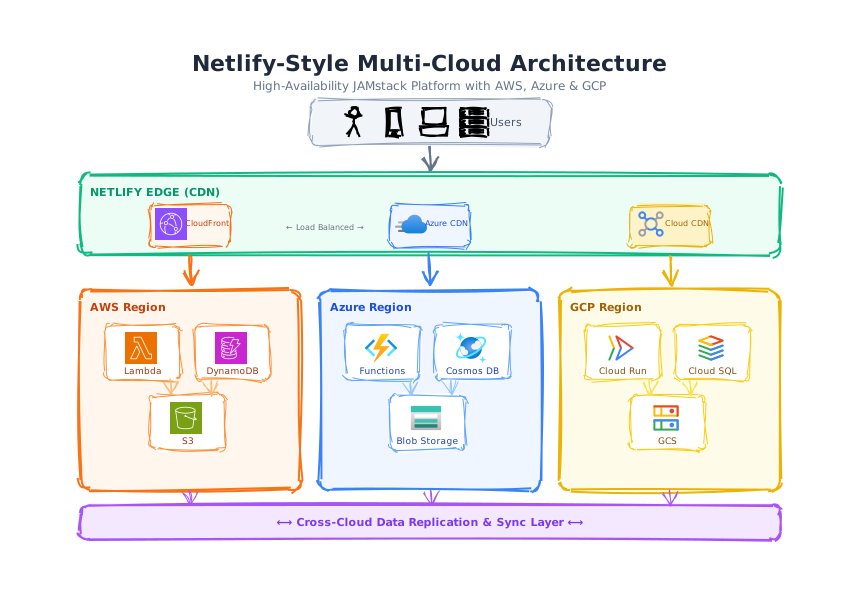
Architecture Layers
| Layer | Components | Color |
|---|---|---|
| Users | Person, Phone, Laptop, Server icons | Gray (#f1f5f9) |
| CDN Edge | CloudFront, Azure CDN, GCP CDN | Green (#ecfdf5) |
| AWS Region | Lambda, DynamoDB, S3 | Orange (#fff7ed) |
| Azure Region | Functions, Cosmos DB, Blob Storage | Blue (#eff6ff) |
| GCP Region | Cloud Run, Cloud SQL, GCS | Yellow (#fefce8) |
| Sync Layer | Cross-cloud replication | Purple (#f3e8ff) |
Step 1: Create the Title Section
Add Title and Subtitle
Start with a professional title centered at the top:
{
  "type": "text",
  "id": "title",
  "x": 20, "y": 10, "w": 760, "h": 30,
  "text": "Netlify-Style Multi-Cloud Architecture",
  "fontSize": 22,
  "fontWeight": "bold",
  "align": "center",
  "options": { "stroke": "#1e293b" }
}
Step 2: Create the Users Layer
Add User Icons with Background
Create a container with device icons representing different user types:
// Background container
{
  "type": "rectangle",
  "id": "users-bg",
  "x": 280, "y": 60, "w": 240, "h": 45,
  "borderRadius": 8,
  "options": { "fill": "#f1f5f9", "stroke": "#94a3b8", "fillStyle": "solid" }
},
// Icons using iconCategory and iconName
{
  "type": "icon",
  "id": "user1",
  "x": 310, "y": 68, "w": 28, "h": 28,
  "iconCategory": "people",
  "iconName": "person"
}
Step 3: Build the CDN Layer
Create Edge CDN Container with Provider Cards
Add a green container spanning the width with three CDN provider cards:
// Main CDN container
{
  "type": "rectangle",
  "id": "cdn-bg",
  "x": 50, "y": 135, "w": 700, "h": 80,
  "borderRadius": 10,
  "options": { "fill": "#ecfdf5", "stroke": "#10b981", "strokeWidth": 2 }
},
// AWS CloudFront card with image element
{
  "type": "image",
  "id": "cf-icon",
  "x": 125, "y": 168, "w": 32, "h": 32,
  "src": "aws_icons/.../Arch_Amazon-CloudFront_64.svg"
}
image element type with
the src property pointing to the icon path.
Step 4: Create Cloud Region Containers
Build Three Cloud Region Boxes
Each region has a distinct color and contains compute, database, and storage services:
AWS Orange theme (#f97316)
Azure Blue theme (#3b82f6)
GCP Yellow theme (#eab308)
// AWS Region container
{
  "type": "rectangle",
  "id": "aws-region",
  "x": 50, "y": 250, "w": 220, "h": 200,
  "borderRadius": 10,
  "options": { "fill": "#fff7ed", "stroke": "#f97316", "strokeWidth": 2 }
}
// Repeat pattern for Azure (#eff6ff/#3b82f6) and GCP (#fefce8/#eab308)
Step 5: Add Service Cards Inside Regions
Create Service Cards with Icons
Each region contains three service cards (compute, database, storage):
// Service card pattern: rectangle + image + text
{
  "type": "rectangle",
  "id": "aws-compute",
  "x": 75, "y": 285, "w": 75, "h": 55,
  "borderRadius": 6,
  "options": { "fill": "#ffffff", "stroke": "#fb923c" }
},
{
  "type": "image",
  "id": "aws-lambda",
  "x": 95, "y": 292, "w": 32, "h": 32,
  "src": "aws_icons/.../Arch_AWS-Lambda_64.svg"
},
{
  "type": "text",
  "id": "aws-compute-t",
  "x": 75, "y": 325, "w": 75, "h": 10,
  "text": "Lambda",
  "fontSize": 9,
  "align": "center"
}
Step 6: Add Data Replication Layer
Create Cross-Cloud Sync Layer
Add a purple bar at the bottom to show data replication:
{
  "type": "rectangle",
  "id": "sync-bg",
  "x": 50, "y": 465, "w": 700, "h": 35,
  "borderRadius": 8,
  "options": { "fill": "#f3e8ff", "stroke": "#a855f7", "strokeWidth": 2 }
},
{
  "type": "text",
  "id": "sync-t",
  "x": 60, "y": 475, "w": 680, "h": 14,
  "text": "⟷ Cross-Cloud Data Replication \u0026 Sync Layer ⟷",
  "align": "center",
  "fontWeight": "bold"
}
Key Design Principles
- Color coding — Each cloud provider has a distinct color scheme
- Consistent sizing — Region boxes and service cards use uniform dimensions
- Layered layout — Users → CDN → Regions → Sync (top to bottom)
- Official icons — Use
imageelement with provider icon paths - Arrows — Connect layers with vertical arrows showing data flow
borderRadius consistently (e.g., 10 for containers, 6 for cards) for a polished look.
v2 Modernized Version
Full multi-cloud architecture using the v2 toolbox: a 4-layer VStack mental model (users → CDN → regions → sync) realised as stacked HStacks; each region holds a VStack of differentiated service cards (cylinder for DB, cube for storage); colour themes are named styles with extends; SLA badges hang off the side via position: { rightOf }; arrows use expressions so they auto-track when layers move.
{
  "version": "2.0",
  "canvas": { "width": 1500, "height": 1140, "background": "cream", "padding": 0 },
  "theme": { "roughness": 1.3, "bowing": 1.0, "fillStyle": "hachure", "fontFamily": "Comic Sans MS" },

  "vars": {
    "deviceW": 140, "deviceH": 90,
    "cdnW": 300, "cdnH": 90,
    "regionW": 400, "regionH": 500,
    "svcW": 340, "svcH": 95,
    "badgeW": 200, "badgeH": 70
  },

  "styles": {
    "device":       { "fill": "slate.100", "stroke": "slate.600", "strokeWidth": 2, "fillStyle": "solid" },
    "cdn":          { "fill": "green.100", "stroke": "green.700", "strokeWidth": 2, "fillStyle": "solid" },
    "region":       { "strokeWidth": 3, "fillStyle": "hachure" },
    "aws":          { "extends": "region", "fill": "orange.50", "stroke": "orange.600" },
    "azure":        { "extends": "region", "fill": "blue.50",   "stroke": "blue.600"   },
    "gcp":          { "extends": "region", "fill": "yellow.50", "stroke": "yellow.600" },
    "svc":          { "fill": "white", "fillStyle": "solid", "strokeWidth": 2 },
    "awsSvc":       { "extends": "svc", "stroke": "orange.500" },
    "azSvc":        { "extends": "svc", "stroke": "blue.500" },
    "gcpSvc":       { "extends": "svc", "stroke": "yellow.600" },
    "sync":         { "fill": "purple.100", "stroke": "purple.700", "strokeWidth": 3, "fillStyle": "hachure" },
    "badge":        { "fill": "amber.100", "stroke": "amber.700", "strokeWidth": 2, "fillStyle": "solid" },
    "edge":         { "stroke": "slate.700", "strokeWidth": 2 }
  },

  "elements": [
    { "id": "title",    "type": "text", "x": 0, "y": 30, "w": 1500, "h": 40, "text": "Netlify-Style Multi-Cloud Architecture", "fontSize": 28, "fontWeight": "bold", "align": "center" },
    { "id": "subtitle", "type": "text", "x": 0, "y": 72, "w": 1500, "h": 22, "text": "Global edge delivery · 3 cloud regions · active-active data sync · 99.99% SLA", "fontSize": 14, "align": "center" },

    { "id": "lbl-users", "type": "text", "x": 40, "y": 130, "w": 220, "h": 24, "text": "1. End Users", "fontSize": 15, "fontWeight": "bold" },
    { "type": "HStack", "x": 380, "y": 120, "gap": 30, "children": [
      { "id": "phone",   "type": "rectangle", "style": "device", "w": "$deviceW", "h": "$deviceH", "borderRadius": 14 },
      { "id": "laptop",  "type": "rectangle", "style": "device", "w": "$deviceW", "h": "$deviceH", "borderRadius": 14 },
      { "id": "desktop", "type": "rectangle", "style": "device", "w": "$deviceW", "h": "$deviceH", "borderRadius": 14 },
      { "id": "tablet",  "type": "rectangle", "style": "device", "w": "$deviceW", "h": "$deviceH", "borderRadius": 14 }
    ]},
    { "id": "phone-t",   "type": "text", "position": { "inside": "#phone",   "align": "center", "padding": 14 }, "w": 140, "h": 60, "text": "📱\nMobile",   "fontSize": 14, "fontWeight": "bold", "align": "center" },
    { "id": "laptop-t",  "type": "text", "position": { "inside": "#laptop",  "align": "center", "padding": 14 }, "w": 140, "h": 60, "text": "💻\nLaptop",   "fontSize": 14, "fontWeight": "bold", "align": "center" },
    { "id": "desktop-t", "type": "text", "position": { "inside": "#desktop", "align": "center", "padding": 14 }, "w": 140, "h": 60, "text": "🖥️\nDesktop", "fontSize": 14, "fontWeight": "bold", "align": "center" },
    { "id": "tablet-t",  "type": "text", "position": { "inside": "#tablet",  "align": "center", "padding": 14 }, "w": 140, "h": 60, "text": "📋\nTablet",   "fontSize": 14, "fontWeight": "bold", "align": "center" },

    { "id": "arr-1", "type": "arrow", "style": "edge", "x": 750, "y": 220, "w": 0, "h": 50, "endArrowhead": "arrow" },

    { "id": "lbl-cdn", "type": "text", "x": 40, "y": 305, "w": 220, "h": 24, "text": "2. CDN Edge", "fontSize": 15, "fontWeight": "bold" },
    { "type": "HStack", "x": 270, "y": 285, "gap": 40, "children": [
      { "id": "cloudfront", "type": "rectangle", "style": "cdn", "w": "$cdnW", "h": "$cdnH", "borderRadius": 12 },
      { "id": "azCDN",      "type": "rectangle", "style": "cdn", "w": "$cdnW", "h": "$cdnH", "borderRadius": 12 },
      { "id": "gcpCDN",     "type": "rectangle", "style": "cdn", "w": "$cdnW", "h": "$cdnH", "borderRadius": 12 }
    ]},
    { "id": "cf-t",   "type": "text", "position": { "inside": "#cloudfront", "align": "top-center",    "padding": 14 }, "w": 300, "h": 24, "text": "☁️ AWS CloudFront",  "fontSize": 16, "fontWeight": "bold", "align": "center" },
    { "id": "cf-s",   "type": "text", "position": { "inside": "#cloudfront", "align": "bottom-center", "padding": 12 }, "w": 300, "h": 18, "text": "450+ edge POPs",     "fontSize": 12, "align": "center" },
    { "id": "azc-t",  "type": "text", "position": { "inside": "#azCDN",      "align": "top-center",    "padding": 14 }, "w": 300, "h": 24, "text": "☁️ Azure Front Door", "fontSize": 16, "fontWeight": "bold", "align": "center" },
    { "id": "azc-s",  "type": "text", "position": { "inside": "#azCDN",      "align": "bottom-center", "padding": 12 }, "w": 300, "h": 18, "text": "180+ edge POPs",      "fontSize": 12, "align": "center" },
    { "id": "gcc-t",  "type": "text", "position": { "inside": "#gcpCDN",     "align": "top-center",    "padding": 14 }, "w": 300, "h": 24, "text": "☁️ GCP Cloud CDN",    "fontSize": 16, "fontWeight": "bold", "align": "center" },
    { "id": "gcc-s",  "type": "text", "position": { "inside": "#gcpCDN",     "align": "bottom-center", "padding": 12 }, "w": 300, "h": 18, "text": "130+ edge POPs",      "fontSize": 12, "align": "center" },

    { "id": "arr-2", "type": "arrow", "style": "edge", "x": 750, "y": 385, "w": 0, "h": 50, "endArrowhead": "arrow" },

    { "id": "lbl-reg", "type": "text", "x": 40, "y": 465, "w": 220, "h": 24, "text": "3. Cloud Regions", "fontSize": 15, "fontWeight": "bold" },
    { "type": "HStack", "x": 220, "y": 450, "gap": 35, "children": [
      { "id": "awsRegion",   "type": "rectangle", "style": "aws",   "w": "$regionW", "h": "$regionH", "borderRadius": 14 },
      { "id": "azureRegion", "type": "rectangle", "style": "azure", "w": "$regionW", "h": "$regionH", "borderRadius": 14 },
      { "id": "gcpRegion",   "type": "rectangle", "style": "gcp",   "w": "$regionW", "h": "$regionH", "borderRadius": 14 }
    ]},
    { "id": "aws-h", "type": "text", "position": { "inside": "#awsRegion",   "align": "top-center", "padding": 18 }, "w": 400, "h": 32, "text": "🇺🇸 AWS · us-east-1",        "fontSize": 18, "fontWeight": "bold", "align": "center" },
    { "id": "az-h",  "type": "text", "position": { "inside": "#azureRegion", "align": "top-center", "padding": 18 }, "w": 400, "h": 32, "text": "🇮🇪 Azure · westeurope",     "fontSize": 18, "fontWeight": "bold", "align": "center" },
    { "id": "gcp-h", "type": "text", "position": { "inside": "#gcpRegion",   "align": "top-center", "padding": 18 }, "w": 400, "h": 32, "text": "🇯🇵 GCP · asia-northeast1",  "fontSize": 18, "fontWeight": "bold", "align": "center" },

    { "type": "VStack", "x": 250, "y": 510, "gap": 15, "children": [
      { "id": "aws-compute", "type": "rectangle", "style": "awsSvc", "w": "$svcW", "h": "$svcH", "borderRadius": 8 },
      { "id": "aws-db",      "type": "cylinder",  "style": "awsSvc", "w": "$svcW", "h": "$svcH" },
      { "id": "aws-storage", "type": "cube",      "style": "awsSvc", "w": "$svcW", "h": "$svcH" },
      { "id": "aws-queue",   "type": "hexagon",   "style": "awsSvc", "w": "$svcW", "h": "$svcH" }
    ]},
    { "id": "aws-c-t", "type": "text", "position": { "inside": "#aws-compute", "align": "center", "padding": 14 }, "w": 340, "h": 32, "text": "λ Lambda · serverless functions", "fontSize": 14, "fontWeight": "bold", "align": "center" },
    { "id": "aws-d-t", "type": "text", "position": { "inside": "#aws-db",      "align": "center", "padding": 14 }, "w": 340, "h": 32, "text": "DynamoDB · NoSQL global tables",  "fontSize": 14, "fontWeight": "bold", "align": "center" },
    { "id": "aws-s-t", "type": "text", "position": { "inside": "#aws-storage", "align": "center", "padding": 14 }, "w": 340, "h": 32, "text": "S3 · object storage",             "fontSize": 14, "fontWeight": "bold", "align": "center" },
    { "id": "aws-q-t", "type": "text", "position": { "inside": "#aws-queue",   "align": "center", "padding": 14 }, "w": 340, "h": 32, "text": "SQS · message queue",             "fontSize": 14, "fontWeight": "bold", "align": "center" },

    { "type": "VStack", "x": 685, "y": 510, "gap": 15, "children": [
      { "id": "az-compute", "type": "rectangle", "style": "azSvc", "w": "$svcW", "h": "$svcH", "borderRadius": 8 },
      { "id": "az-db",      "type": "cylinder",  "style": "azSvc", "w": "$svcW", "h": "$svcH" },
      { "id": "az-storage", "type": "cube",      "style": "azSvc", "w": "$svcW", "h": "$svcH" },
      { "id": "az-queue",   "type": "hexagon",   "style": "azSvc", "w": "$svcW", "h": "$svcH" }
    ]},
    { "id": "az-c-t", "type": "text", "position": { "inside": "#az-compute", "align": "center", "padding": 14 }, "w": 340, "h": 32, "text": "Functions · serverless",        "fontSize": 14, "fontWeight": "bold", "align": "center" },
    { "id": "az-d-t", "type": "text", "position": { "inside": "#az-db",      "align": "center", "padding": 14 }, "w": 340, "h": 32, "text": "Cosmos DB · multi-model",       "fontSize": 14, "fontWeight": "bold", "align": "center" },
    { "id": "az-s-t", "type": "text", "position": { "inside": "#az-storage", "align": "center", "padding": 14 }, "w": 340, "h": 32, "text": "Blob Storage",                  "fontSize": 14, "fontWeight": "bold", "align": "center" },
    { "id": "az-q-t", "type": "text", "position": { "inside": "#az-queue",   "align": "center", "padding": 14 }, "w": 340, "h": 32, "text": "Service Bus · pub/sub",         "fontSize": 14, "fontWeight": "bold", "align": "center" },

    { "type": "VStack", "x": 1120, "y": 510, "gap": 15, "children": [
      { "id": "gcp-compute", "type": "rectangle", "style": "gcpSvc", "w": "$svcW", "h": "$svcH", "borderRadius": 8 },
      { "id": "gcp-db",      "type": "cylinder",  "style": "gcpSvc", "w": "$svcW", "h": "$svcH" },
      { "id": "gcp-storage", "type": "cube",      "style": "gcpSvc", "w": "$svcW", "h": "$svcH" },
      { "id": "gcp-queue",   "type": "hexagon",   "style": "gcpSvc", "w": "$svcW", "h": "$svcH" }
    ]},
    { "id": "gcp-c-t", "type": "text", "position": { "inside": "#gcp-compute", "align": "center", "padding": 14 }, "w": 340, "h": 32, "text": "Cloud Run · containers",       "fontSize": 14, "fontWeight": "bold", "align": "center" },
    { "id": "gcp-d-t", "type": "text", "position": { "inside": "#gcp-db",      "align": "center", "padding": 14 }, "w": 340, "h": 32, "text": "Spanner · global SQL",         "fontSize": 14, "fontWeight": "bold", "align": "center" },
    { "id": "gcp-s-t", "type": "text", "position": { "inside": "#gcp-storage", "align": "center", "padding": 14 }, "w": 340, "h": 32, "text": "Cloud Storage",                 "fontSize": 14, "fontWeight": "bold", "align": "center" },
    { "id": "gcp-q-t", "type": "text", "position": { "inside": "#gcp-queue",   "align": "center", "padding": 14 }, "w": 340, "h": 32, "text": "Pub/Sub · streaming",          "fontSize": 14, "fontWeight": "bold", "align": "center" },

    { "id": "arr-3", "type": "arrow", "style": "edge", "x": 750, "y": 960, "w": 0, "h": 35, "endArrowhead": "arrow", "options": { "stroke": "purple.700" } },

    { "id": "lbl-sync", "type": "text", "x": 40, "y": 1020, "w": 220, "h": 24, "text": "4. Sync Layer", "fontSize": 15, "fontWeight": "bold" },
    { "id": "syncBar",  "type": "rectangle", "style": "sync", "x": 220, "y": 1000, "w": 1260, "h": 70, "borderRadius": 14 },
    { "id": "sync-t1",  "type": "text", "position": { "inside": "#syncBar", "align": "top-center",    "padding": 12 }, "w": 1260, "h": 24, "text": "🔄 Cross-Cloud Data Replication", "fontSize": 17, "fontWeight": "bold", "align": "center" },
    { "id": "sync-t2",  "type": "text", "position": { "inside": "#syncBar", "align": "bottom-center", "padding": 12 }, "w": 1260, "h": 22, "text": "CDC streams · event-driven sync · eventual consistency ~200ms · conflict resolution: LWW", "fontSize": 13, "align": "center" }
  ]
}
Showcase: 5 element types (rectangle, cylinder, cube, hexagon, arrow, text); 12 named styles with extends per cloud; 4 cross-axis layout containers; 16 position: { inside } placements; 5 vars for sizing knobs. Recolouring AWS, changing the global theme roughness, or swapping a service type is each a one-line edit.
☁️ Build Your Cloud Architecture
Create professional multi-cloud diagrams for your documentation.
Open Privacy Sketch