HStack, VStack, Grid), relative positioning (position: { below, rightOf, inside }), variables ($varName), and named styles. The hand-computed x/y values in the steps below still work, but the same diagram can be expressed more concisely. See the v2 power features reference, and the modernized version at the bottom of this tutorial.
What You'll Build
Mindmaps are perfect for brainstorming, exploring product concepts, and organizing ideas hierarchically. In this tutorial, you'll create a product lifecycle mindmap with:
- Central topic node (the main concept)
- Primary branches (major lifecycle stages)
- Secondary branches (details within each stage)
- Color-coded themes for visual organization
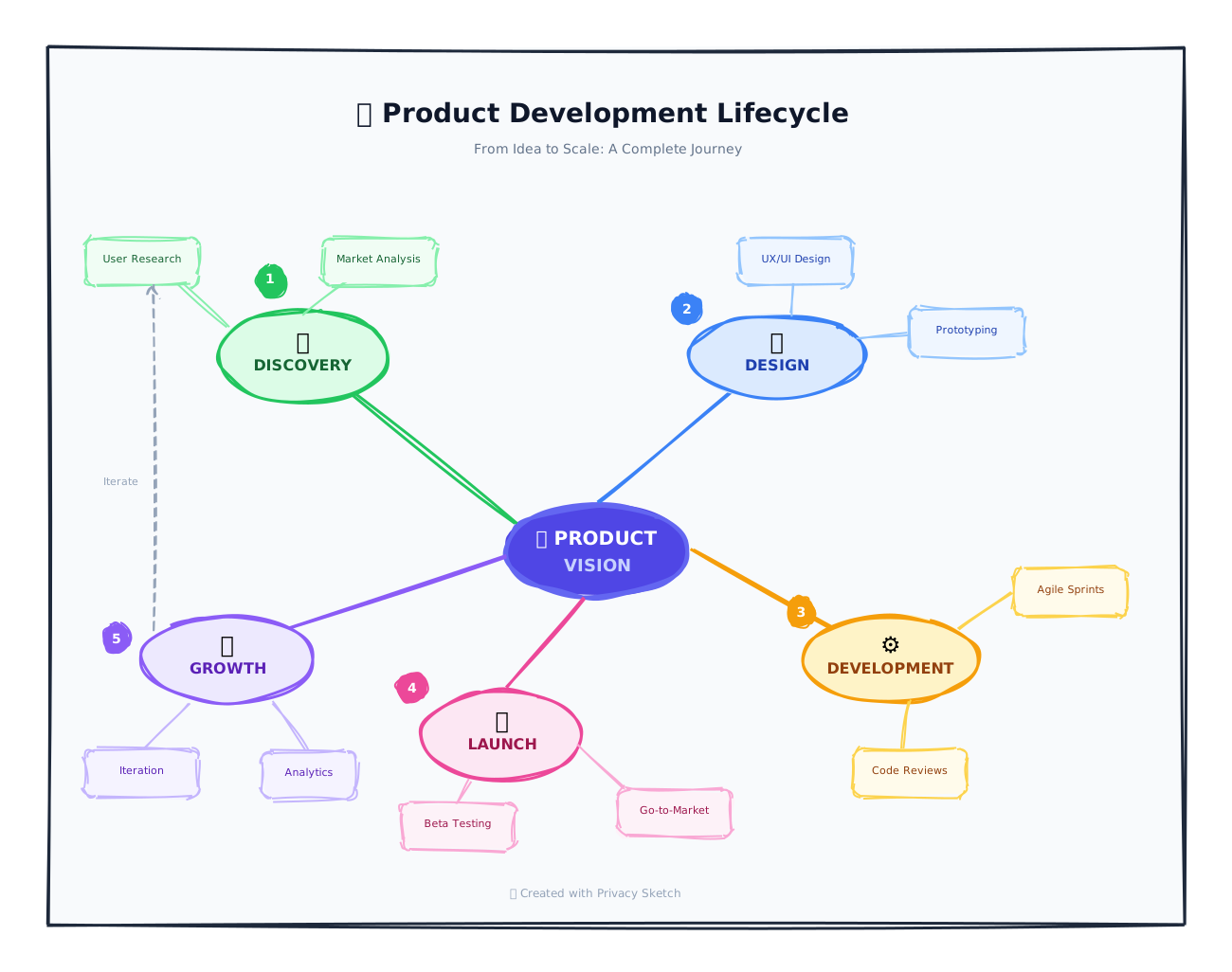
The Mindmap Pattern
Mindmaps radiate from a central idea. Each branch represents a related concept:
| Stage | Color | Example Ideas |
|---|---|---|
| Ideation | Yellow | Brainstorming, research, validation |
| Development | Blue | Design, coding, testing |
| Launch | Green | Marketing, PR, go-to-market |
| Growth | Purple | Analytics, optimization, scaling |
| Maturity | Orange | Maintenance, updates, sunset |
Step 1: Create the Central Node
The central node is the heart of your mindmap. Make it prominent and visually distinct.
Add the Central Concept
{
  "id": "center",
  "type": "ellipse",
  "x": 550,
  "y": 350,
  "w": 180,
  "h": 100,
  "options": {
    "stroke": "#0f172a",
    "strokeWidth": 4,
    "fill": "#fbbf24",
    "fillStyle": "solid"
  }
},
{
  "id": "center-label",
  "type": "text",
  "x": 550,
  "y": 385,
  "w": 180,
  "h": 30,
  "text": "🚀 Product\\nLifecycle",
  "fontSize": 18,
  "fontWeight": "bold",
  "align": "center",
  "options": { "stroke": "#1e293b" }
}
Step 2: Add Primary Branches
Use curved arrows or lines radiating from the center to connect primary concepts.
Create Radial Connections
// Connection to "Ideation" (top-left)
{
  "id": "line-ideation",
  "type": "curvedArrow",
  "x": 560,
  "y": 350,
  "w": -150,
  "h": -100,
  "endArrowhead": "arrow",
  "options": {
    "stroke": "amber.500",
    "strokeWidth": 3
  }
}

// Ideation branch node
{
  "id": "ideation",
  "type": "rectangle",
  "x": 320,
  "y": 200,
  "w": 140,
  "h": 50,
  "borderRadius": 25,  // Pill shape!
  "options": {
    "stroke": "amber.500",
    "fill": "amber.100",
    "fillStyle": "solid"
  }
}
Tip: Use curvedArrow for organic-looking connections. Use large
borderRadius values to create pill-shaped nodes.
Radial Positioning Math
Position branches around the center like a clock: top (12 o'clock), top-right (2 o'clock), right (3 o'clock), etc. Use negative w/h values for left and up directions.
Step 3: Add Secondary Branches
Each primary branch can have sub-branches for more detail. Make these smaller and use lighter colors.
Add Sub-Branches
// Sub-branches under "Ideation"
{
  "id": "ideation-research",
  "type": "rectangle",
  "x": 180,
  "y": 120,
  "w": 100,
  "h": 35,
  "borderRadius": 17,
  "options": {
    "stroke": "amber.400",
    "fill": "amber.50",
    "fillStyle": "solid"
  }
},
{
  "id": "ideation-research-label",
  "type": "text",
  "x": 180,
  "y": 130,
  "w": 100,
  "h": 15,
  "text": "🔍 Research",
  "fontSize": 11,
  "align": "center"
}
Repeat this pattern for each sub-branch: Validation, Brainstorming, etc.
Design Principles for Mindmaps
- Color hierarchy — Central node is darkest, branches get lighter
- Size hierarchy — Central node largest, sub-branches smallest
- Use emojis — They provide instant visual recognition
- Keep text short — 1-3 words per node
- Curved connections — Feel more organic than straight lines
v2 Modernized Version
Full product brainstorm: central hub + 6 branches (Research, Design, Engineering, Marketing, Sales, Support) positioned radially around the hub. Each branch carries 4 sub-leaves with status icons. Cross-department dependencies are shown as dashed connector lines. Demonstrates radial layout via position: { leftOf / rightOf / above / below } plus 6 inline VStacks anchored to each branch, named styles for status, and expression-driven connectors.
{
  "version": "2.0",
  "canvas": { "width": 1700, "height": 1100, "background": "cream", "padding": 0 },
  "theme": { "roughness": 1.4, "bowing": 1.1, "fillStyle": "hachure", "fontFamily": "Comic Sans MS" },

  "vars": { "branchW": 200, "branchH": 70, "leafW": 200, "leafH": 44 },

  "styles": {
    "hub":         { "fill": "indigo.600", "stroke": "indigo.800", "strokeWidth": 4, "fillStyle": "solid" },
    "branch":      { "strokeWidth": 3, "fillStyle": "solid" },
    "br-research": { "extends": "branch", "fill": "blue.200",   "stroke": "blue.700" },
    "br-design":   { "extends": "branch", "fill": "purple.200", "stroke": "purple.700" },
    "br-eng":      { "extends": "branch", "fill": "green.200",  "stroke": "green.700" },
    "br-mkt":      { "extends": "branch", "fill": "pink.200",   "stroke": "pink.700" },
    "br-sales":    { "extends": "branch", "fill": "amber.200",  "stroke": "amber.700" },
    "br-support":  { "extends": "branch", "fill": "cyan.200",   "stroke": "cyan.700" },
    "leaf":        { "fill": "white",      "fillStyle": "solid", "strokeWidth": 2 },
    "leaf-done":   { "extends": "leaf",   "stroke": "green.500" },
    "leaf-prog":   { "extends": "leaf",   "stroke": "blue.500" },
    "leaf-todo":   { "extends": "leaf",   "stroke": "slate.500" },
    "leaf-block":  { "extends": "leaf",   "stroke": "red.500" }
  },

  "elements": [
    { "id": "title", "type": "text", "x": 0, "y": 25, "w": 1700, "h": 38, "text": "New Product Launch · Q2 Mindmap", "fontSize": 26, "fontWeight": "bold", "align": "center" },
    { "id": "sub",   "type": "text", "x": 0, "y": 66, "w": 1700, "h": 22, "text": "6 departments · 24 workstreams · status as of Sprint 4", "fontSize": 13, "align": "center" },

    { "id": "hub",   "type": "ellipse", "style": "hub", "x": 700, "y": 480, "w": 300, "h": 130 },
    { "id": "hub-t", "type": "text", "position": { "inside": "#hub", "align": "center", "padding": 30 }, "w": 300, "h": 60, "text": "🚀 Project Atlas\nproduct launch", "fontSize": 20, "fontWeight": "bold", "align": "center", "options": { "stroke": "white" } },

    { "id": "b-research", "type": "rectangle", "style": "br-research", "position": { "leftOf":  "#hub", "gap": 200, "offset": { "x": 0, "y": -180 } }, "w": "$branchW", "h": "$branchH", "borderRadius": 12 },
    { "id": "b-design",   "type": "rectangle", "style": "br-design",   "position": { "above":   "#hub", "gap": 200 },                                  "w": "$branchW", "h": "$branchH", "borderRadius": 12 },
    { "id": "b-eng",      "type": "rectangle", "style": "br-eng",      "position": { "rightOf": "#hub", "gap": 200, "offset": { "x": 0, "y": -180 } }, "w": "$branchW", "h": "$branchH", "borderRadius": 12 },
    { "id": "b-mkt",      "type": "rectangle", "style": "br-mkt",      "position": { "leftOf":  "#hub", "gap": 200, "offset": { "x": 0, "y": 180 } },  "w": "$branchW", "h": "$branchH", "borderRadius": 12 },
    { "id": "b-sales",    "type": "rectangle", "style": "br-sales",    "position": { "below":   "#hub", "gap": 200 },                                  "w": "$branchW", "h": "$branchH", "borderRadius": 12 },
    { "id": "b-support",  "type": "rectangle", "style": "br-support",  "position": { "rightOf": "#hub", "gap": 200, "offset": { "x": 0, "y": 180 } },  "w": "$branchW", "h": "$branchH", "borderRadius": 12 },

    { "id": "br-t",       "type": "text", "position": { "inside": "#b-research", "align": "center", "padding": 18 }, "w": 200, "h": 28, "text": "🔍 Research",   "fontSize": 16, "fontWeight": "bold", "align": "center" },
    { "id": "bd-t",       "type": "text", "position": { "inside": "#b-design",   "align": "center", "padding": 18 }, "w": 200, "h": 28, "text": "🎨 Design",     "fontSize": 16, "fontWeight": "bold", "align": "center" },
    { "id": "be-t",       "type": "text", "position": { "inside": "#b-eng",      "align": "center", "padding": 18 }, "w": 200, "h": 28, "text": "🛠️ Engineering", "fontSize": 16, "fontWeight": "bold", "align": "center" },
    { "id": "bm-t",       "type": "text", "position": { "inside": "#b-mkt",      "align": "center", "padding": 18 }, "w": 200, "h": 28, "text": "📣 Marketing",   "fontSize": 16, "fontWeight": "bold", "align": "center" },
    { "id": "bs-t",       "type": "text", "position": { "inside": "#b-sales",    "align": "center", "padding": 18 }, "w": 200, "h": 28, "text": "💼 Sales",       "fontSize": 16, "fontWeight": "bold", "align": "center" },
    { "id": "bsp-t",      "type": "text", "position": { "inside": "#b-support",  "align": "center", "padding": 18 }, "w": 200, "h": 28, "text": "🛟 Support",     "fontSize": 16, "fontWeight": "bold", "align": "center" },

    { "type": "VStack", "x": 30,  "y": 90,  "gap": 10, "children": [
      { "id": "r1", "type": "rectangle", "style": "leaf-done",  "w": "$leafW", "h": "$leafH", "borderRadius": 8 },
      { "id": "r2", "type": "rectangle", "style": "leaf-done",  "w": "$leafW", "h": "$leafH", "borderRadius": 8 },
      { "id": "r3", "type": "rectangle", "style": "leaf-prog",  "w": "$leafW", "h": "$leafH", "borderRadius": 8 },
      { "id": "r4", "type": "rectangle", "style": "leaf-todo",  "w": "$leafW", "h": "$leafH", "borderRadius": 8 }
    ]},
    { "id": "r1-t", "type": "text", "position": { "inside": "#r1", "align": "center", "padding": 10 }, "w": 200, "h": 22, "text": "✓ User interviews",  "fontSize": 12, "fontWeight": "bold", "align": "center" },
    { "id": "r2-t", "type": "text", "position": { "inside": "#r2", "align": "center", "padding": 10 }, "w": 200, "h": 22, "text": "✓ Competitor scan",  "fontSize": 12, "fontWeight": "bold", "align": "center" },
    { "id": "r3-t", "type": "text", "position": { "inside": "#r3", "align": "center", "padding": 10 }, "w": 200, "h": 22, "text": "↻ Survey (n=400)",   "fontSize": 12, "fontWeight": "bold", "align": "center" },
    { "id": "r4-t", "type": "text", "position": { "inside": "#r4", "align": "center", "padding": 10 }, "w": 200, "h": 22, "text": "○ Persona writeup",  "fontSize": 12, "fontWeight": "bold", "align": "center" },

    { "type": "VStack", "x": 740, "y": 80,  "gap": 10, "children": [
      { "id": "d1", "type": "rectangle", "style": "leaf-done",  "w": "$leafW", "h": "$leafH", "borderRadius": 8 },
      { "id": "d2", "type": "rectangle", "style": "leaf-prog",  "w": "$leafW", "h": "$leafH", "borderRadius": 8 },
      { "id": "d3", "type": "rectangle", "style": "leaf-prog",  "w": "$leafW", "h": "$leafH", "borderRadius": 8 },
      { "id": "d4", "type": "rectangle", "style": "leaf-todo",  "w": "$leafW", "h": "$leafH", "borderRadius": 8 }
    ]},
    { "id": "d1-t", "type": "text", "position": { "inside": "#d1", "align": "center", "padding": 10 }, "w": 200, "h": 22, "text": "✓ Brand system",    "fontSize": 12, "fontWeight": "bold", "align": "center" },
    { "id": "d2-t", "type": "text", "position": { "inside": "#d2", "align": "center", "padding": 10 }, "w": 200, "h": 22, "text": "↻ Hi-fi mockups",   "fontSize": 12, "fontWeight": "bold", "align": "center" },
    { "id": "d3-t", "type": "text", "position": { "inside": "#d3", "align": "center", "padding": 10 }, "w": 200, "h": 22, "text": "↻ Interaction proto", "fontSize": 12, "fontWeight": "bold", "align": "center" },
    { "id": "d4-t", "type": "text", "position": { "inside": "#d4", "align": "center", "padding": 10 }, "w": 200, "h": 22, "text": "○ Usability test 2", "fontSize": 12, "fontWeight": "bold", "align": "center" },

    { "type": "VStack", "x": 1450,"y": 90,  "gap": 10, "children": [
      { "id": "e1", "type": "rectangle", "style": "leaf-done",  "w": "$leafW", "h": "$leafH", "borderRadius": 8 },
      { "id": "e2", "type": "rectangle", "style": "leaf-prog",  "w": "$leafW", "h": "$leafH", "borderRadius": 8 },
      { "id": "e3", "type": "rectangle", "style": "leaf-prog",  "w": "$leafW", "h": "$leafH", "borderRadius": 8 },
      { "id": "e4", "type": "rectangle", "style": "leaf-block", "w": "$leafW", "h": "$leafH", "borderRadius": 8 }
    ]},
    { "id": "e1-t", "type": "text", "position": { "inside": "#e1", "align": "center", "padding": 10 }, "w": 200, "h": 22, "text": "✓ Architecture RFC", "fontSize": 12, "fontWeight": "bold", "align": "center" },
    { "id": "e2-t", "type": "text", "position": { "inside": "#e2", "align": "center", "padding": 10 }, "w": 200, "h": 22, "text": "↻ Backend services", "fontSize": 12, "fontWeight": "bold", "align": "center" },
    { "id": "e3-t", "type": "text", "position": { "inside": "#e3", "align": "center", "padding": 10 }, "w": 200, "h": 22, "text": "↻ Web client",       "fontSize": 12, "fontWeight": "bold", "align": "center" },
    { "id": "e4-t", "type": "text", "position": { "inside": "#e4", "align": "center", "padding": 10 }, "w": 200, "h": 22, "text": "⚠ Auth (blocked)",   "fontSize": 12, "fontWeight": "bold", "align": "center" },

    { "type": "VStack", "x": 30,  "y": 870, "gap": 10, "children": [
      { "id": "m1", "type": "rectangle", "style": "leaf-prog",  "w": "$leafW", "h": "$leafH", "borderRadius": 8 },
      { "id": "m2", "type": "rectangle", "style": "leaf-todo",  "w": "$leafW", "h": "$leafH", "borderRadius": 8 },
      { "id": "m3", "type": "rectangle", "style": "leaf-todo",  "w": "$leafW", "h": "$leafH", "borderRadius": 8 },
      { "id": "m4", "type": "rectangle", "style": "leaf-todo",  "w": "$leafW", "h": "$leafH", "borderRadius": 8 }
    ]},
    { "id": "m1-t", "type": "text", "position": { "inside": "#m1", "align": "center", "padding": 10 }, "w": 200, "h": 22, "text": "↻ Positioning brief", "fontSize": 12, "fontWeight": "bold", "align": "center" },
    { "id": "m2-t", "type": "text", "position": { "inside": "#m2", "align": "center", "padding": 10 }, "w": 200, "h": 22, "text": "○ Launch site",       "fontSize": 12, "fontWeight": "bold", "align": "center" },
    { "id": "m3-t", "type": "text", "position": { "inside": "#m3", "align": "center", "padding": 10 }, "w": 200, "h": 22, "text": "○ PR pitch list",     "fontSize": 12, "fontWeight": "bold", "align": "center" },
    { "id": "m4-t", "type": "text", "position": { "inside": "#m4", "align": "center", "padding": 10 }, "w": 200, "h": 22, "text": "○ Launch video",      "fontSize": 12, "fontWeight": "bold", "align": "center" },

    { "type": "VStack", "x": 740, "y": 870, "gap": 10, "children": [
      { "id": "sl1", "type": "rectangle", "style": "leaf-todo", "w": "$leafW", "h": "$leafH", "borderRadius": 8 },
      { "id": "sl2", "type": "rectangle", "style": "leaf-todo", "w": "$leafW", "h": "$leafH", "borderRadius": 8 },
      { "id": "sl3", "type": "rectangle", "style": "leaf-todo", "w": "$leafW", "h": "$leafH", "borderRadius": 8 },
      { "id": "sl4", "type": "rectangle", "style": "leaf-todo", "w": "$leafW", "h": "$leafH", "borderRadius": 8 }
    ]},
    { "id": "sl1-t", "type": "text", "position": { "inside": "#sl1", "align": "center", "padding": 10 }, "w": 200, "h": 22, "text": "○ Pricing model",   "fontSize": 12, "fontWeight": "bold", "align": "center" },
    { "id": "sl2-t", "type": "text", "position": { "inside": "#sl2", "align": "center", "padding": 10 }, "w": 200, "h": 22, "text": "○ AE enablement",   "fontSize": 12, "fontWeight": "bold", "align": "center" },
    { "id": "sl3-t", "type": "text", "position": { "inside": "#sl3", "align": "center", "padding": 10 }, "w": 200, "h": 22, "text": "○ Demo scripts",    "fontSize": 12, "fontWeight": "bold", "align": "center" },
    { "id": "sl4-t", "type": "text", "position": { "inside": "#sl4", "align": "center", "padding": 10 }, "w": 200, "h": 22, "text": "○ Customer briefing", "fontSize": 12, "fontWeight": "bold", "align": "center" },

    { "type": "VStack", "x": 1450,"y": 870, "gap": 10, "children": [
      { "id": "sp1", "type": "rectangle", "style": "leaf-todo", "w": "$leafW", "h": "$leafH", "borderRadius": 8 },
      { "id": "sp2", "type": "rectangle", "style": "leaf-todo", "w": "$leafW", "h": "$leafH", "borderRadius": 8 },
      { "id": "sp3", "type": "rectangle", "style": "leaf-todo", "w": "$leafW", "h": "$leafH", "borderRadius": 8 },
      { "id": "sp4", "type": "rectangle", "style": "leaf-todo", "w": "$leafW", "h": "$leafH", "borderRadius": 8 }
    ]},
    { "id": "sp1-t", "type": "text", "position": { "inside": "#sp1", "align": "center", "padding": 10 }, "w": 200, "h": 22, "text": "○ Help center",     "fontSize": 12, "fontWeight": "bold", "align": "center" },
    { "id": "sp2-t", "type": "text", "position": { "inside": "#sp2", "align": "center", "padding": 10 }, "w": 200, "h": 22, "text": "○ Macros / canned", "fontSize": 12, "fontWeight": "bold", "align": "center" },
    { "id": "sp3-t", "type": "text", "position": { "inside": "#sp3", "align": "center", "padding": 10 }, "w": 200, "h": 22, "text": "○ Tier-1 training", "fontSize": 12, "fontWeight": "bold", "align": "center" },
    { "id": "sp4-t", "type": "text", "position": { "inside": "#sp4", "align": "center", "padding": 10 }, "w": 200, "h": 22, "text": "○ Status page",     "fontSize": 12, "fontWeight": "bold", "align": "center" },

    { "id": "spoke1", "type": "line", "x": "=hub.centerX", "y": "=hub.centerY", "w": "=b-research.right - hub.centerX", "h": "=b-research.centerY - hub.centerY", "options": { "stroke": "indigo.500", "strokeWidth": 2 } },
    { "id": "spoke2", "type": "line", "x": "=hub.centerX", "y": "=hub.centerY", "w": "=b-design.centerX - hub.centerX",  "h": "=b-design.bottom - hub.centerY",     "options": { "stroke": "indigo.500", "strokeWidth": 2 } },
    { "id": "spoke3", "type": "line", "x": "=hub.centerX", "y": "=hub.centerY", "w": "=b-eng.x - hub.centerX",           "h": "=b-eng.centerY - hub.centerY",       "options": { "stroke": "indigo.500", "strokeWidth": 2 } },
    { "id": "spoke4", "type": "line", "x": "=hub.centerX", "y": "=hub.centerY", "w": "=b-mkt.right - hub.centerX",       "h": "=b-mkt.centerY - hub.centerY",       "options": { "stroke": "indigo.500", "strokeWidth": 2 } },
    { "id": "spoke5", "type": "line", "x": "=hub.centerX", "y": "=hub.centerY", "w": "=b-sales.centerX - hub.centerX",   "h": "=b-sales.y - hub.centerY",           "options": { "stroke": "indigo.500", "strokeWidth": 2 } },
    { "id": "spoke6", "type": "line", "x": "=hub.centerX", "y": "=hub.centerY", "w": "=b-support.x - hub.centerX",       "h": "=b-support.centerY - hub.centerY",   "options": { "stroke": "indigo.500", "strokeWidth": 2 } },

    { "id": "dep1", "type": "line", "x": "=b-design.centerX", "y": "=b-design.bottom", "w": "=b-eng.centerX - b-design.centerX",      "h": "=b-eng.y - b-design.bottom",     "options": { "stroke": "purple.400", "strokeWidth": 2, "lineStyle": "dashed" } },
    { "id": "dep2", "type": "line", "x": "=b-research.right", "y": "=b-research.centerY","w": "=b-design.centerX - b-research.right",  "h": "=b-design.bottom - b-research.centerY", "options": { "stroke": "blue.400",   "strokeWidth": 2, "lineStyle": "dashed" } },
    { "id": "dep3", "type": "line", "x": "=b-eng.centerX",    "y": "=b-eng.bottom",     "w": "=b-support.centerX - b-eng.centerX",     "h": "=b-support.y - b-eng.bottom",   "options": { "stroke": "green.400",  "strokeWidth": 2, "lineStyle": "dashed" } },

    { "id": "legend", "type": "text", "x": 0, "y": 1050, "w": 1700, "h": 22, "text": "Status legend: ✓ done · ↻ in progress · ○ todo · ⚠ blocked      Dashed lines = cross-team dependency", "fontSize": 12, "align": "center" }
  ]
}
Showcase: radial hub-and-spoke layout achieved via 6 position placements (leftOf / rightOf / above / below with offset); each branch carries its own VStack of status leaves; 4 status styles via extends; 6 spoke connectors + 3 dashed cross-team dependency lines, all computed from anchor element edges. ~80 elements showing how a non-linear topology composes from simple primitives.
🧠 Build Your Mindmap
Open Privacy Sketch and brainstorm your next product idea visually.
Open Privacy SketchNext Steps
- Timeline Tutorial — Create chronological diagrams
- AI History Tutorial — Educational timeline
- LLM Reference — Technical documentation